

Running an eCommerce store becomes much easier when your inventory is under control.
When products move in and out smoothly, customers get what they expect, and your team spends less time fixing mistakes.
But when inventory is poorly managed, even a small oversight can cause stockouts, delays, or overselling, which quickly affects customer trust and increases costs.
As stores grow, their inventory needs also become more complex. Without clear processes, it becomes hard to keep accurate stock counts, forecast demand, or handle returns efficiently.
Good eCommerce inventory management removes these problems by giving store owners full visibility into what they have, what they need, and how products move through their system. It creates a foundation for better planning, more consistent fulfillment, and smoother day-to-day operations.
In this guide, we break down what eCommerce inventory management is, why it matters, the challenges most stores face, and the steps you can take to build a reliable system that supports long-term growth.
Let’s dive in.
What Is eCommerce Inventory Management?

eCommerce inventory management is the process of tracking and controlling the products you sell online. It helps you know what stock you have, where it is stored, and how quickly it is selling. A good system keeps inventory updated when new items arrive, when orders go out, and when returns come in.
It also helps prevent common problems like overselling, stockouts, and excess inventory. With accurate counts, store owners can plan purchases more confidently and keep fast-moving products available.
Modern tools make this easier by syncing stock across all sales channels, automating reorders, and showing real-time product performance. When inventory flows smoothly from suppliers to customers, your store runs more efficiently and delivers a more reliable shopping experience.
Core Components of an Inventory Management System
A strong inventory management system brings together several key elements that help store owners track products accurately, streamline fulfillment, and make better decisions as the business grows. Each component supports a different part of the inventory workflow, and together they create a smooth, predictable process from purchase to delivery.
Stock Tracking: Stock tracking is the foundation of any inventory system. It keeps a real-time record of every product and variation, including details like size or color. As orders come in, stock levels adjust automatically, which helps prevent conflicts and keeps your listings accurate.
Order Management: Order management ensures that products move through the fulfillment process without errors. When a customer places an order, the system immediately reserves the item, updates availability, and keeps order details aligned with stock data. This reduces mistakes during picking and packing and helps orders ship out on time.
Reordering Tools: Reordering tools help you maintain healthy stock levels. They notify you when items reach a low threshold and can even generate purchase orders automatically. This allows you to restock before products run out, especially during busy periods when demand rises quickly.
Warehouse Organization: A well-organized warehouse makes fulfillment faster and more efficient. Clear storage systems help your team locate products quickly, which reduces delays and speeds up packing and shipping. A good organization also minimizes the chances of misplaced or overlooked stock.

Demand Forecasting: Demand forecasting uses past sales data to estimate future stock needs. By recognizing trends and seasonal patterns, stores can prepare for busy periods or upcoming promotions without overordering. This helps keep inventory levels balanced and cost-effective.
Multichannel Syncing: Multichannel syncing keeps your inventory aligned across your website, marketplaces, and POS systems. When all channels share the same stock count, you avoid overselling and ensure customers always see accurate availability wherever they shop.
Reporting and Analytics: Reporting tools provide insights into product performance, stock turnover, and overall sales patterns. These analytics make it easier to identify bestsellers, slow movers, and areas where processes need improvement. With better visibility, store owners can make smarter decisions about purchasing and planning.
Together, these components create a reliable inventory system that reduces errors, improves fulfillment speed, and supports long-term growth as your store evolves.
Key Challenges in eCommerce Inventory Management
Managing inventory becomes more complex as stores grow, add new products, or sell across multiple channels. Even small inaccuracies can lead to delays, lost sales, or higher costs, which is why understanding the common challenges is so important.
Here are the issues most online stores face:
- Poor stock visibility makes it hard to track real-time levels across channels, increasing the risk of overselling.
- Overstocking or running out happens when demand is misjudged, leading to tied-up capital or missed sales.
- Unpredictable supplier timelines cause delays that disrupt fulfillment.
- Limited storage and disorganized warehouses slow down picking and packing.
- Inaccurate data affects forecasting, reordering, and product planning.
- High return rates add workload since items must be inspected, restocked, and recorded correctly.
- Scaling difficulties appear when systems are not prepared for higher volumes or multichannel selling.
These challenges can create bottlenecks, but they are manageable with better processes, clearer data, and tools that keep stock accurate across every channel.
How to Set Up Proper Inventory Management
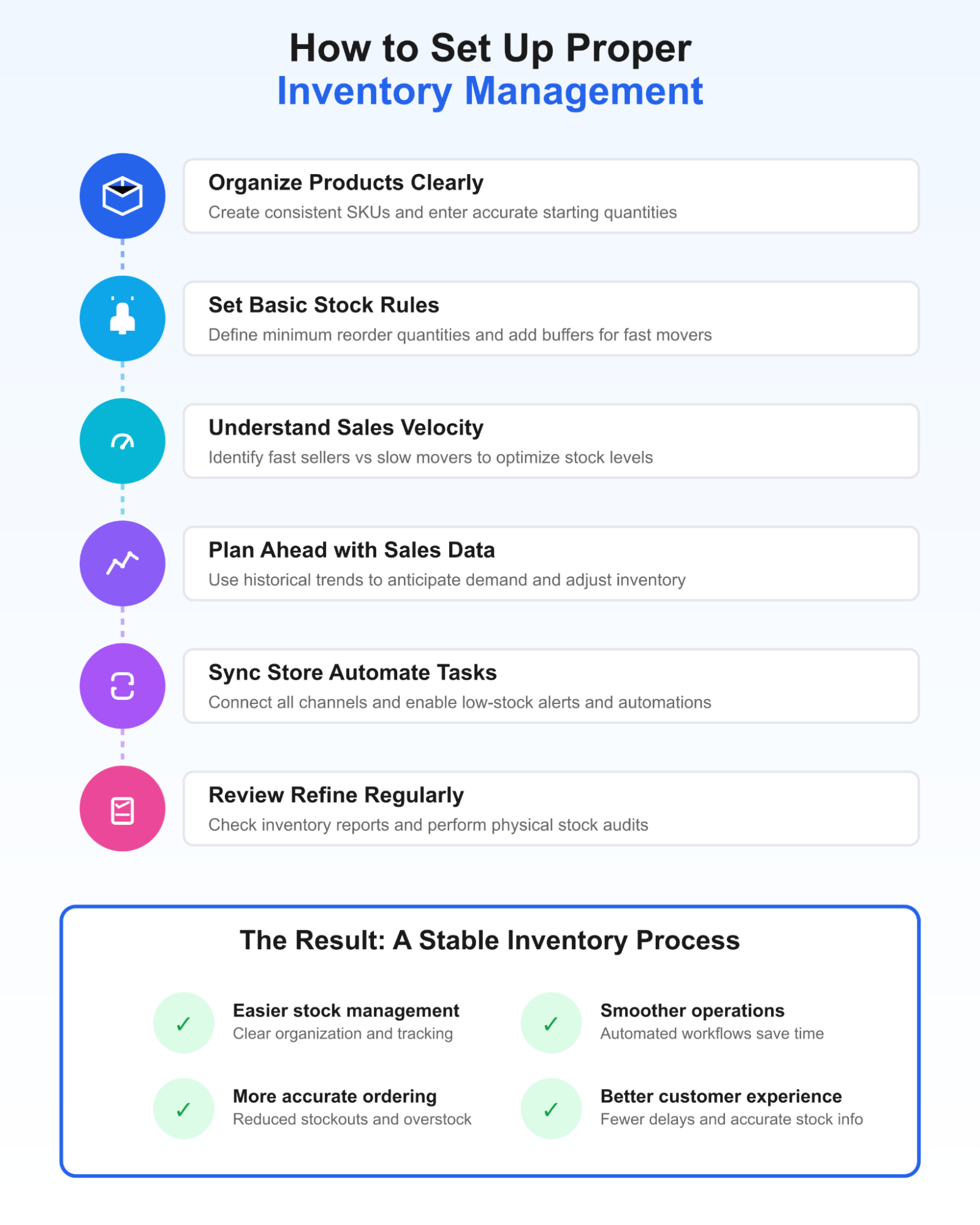
Setting up a reliable inventory system does not need to be overwhelming. The goal is to create a workflow that keeps your stock accurate, reduces mistakes, and supports smoother day-to-day operations. By following the steps below, you can build a structure that grows with your store and gives you more control over your inventory.
Step 1: Organize Your Products Clearly
Start by giving every product and variation a simple, consistent identifier that makes sense to you and your team. Clear SKUs make it easier to update stock levels, manage variations, and troubleshoot issues quickly. It also helps to group items by category, supplier, or season so products are easier to find and track in reports.
Before you move forward, enter accurate starting quantities for each item. This ensures your system reflects real inventory from the beginning and prevents early discrepancies from growing into larger issues later.
Step 2: Set Basic Stock Rules That Guide Reordering
Once your products are organized, define the minimum quantity at which each item should be reordered. These thresholds help you avoid last-minute stockouts, especially for items that sell frequently.
Consider adding a small buffer of extra stock for fast movers or products with longer lead times.
Over time, revisit these rules and adjust them as your sales patterns evolve. This keeps your inventory responsive to growth and seasonal changes rather than fixed to outdated behavior.
Step 3: Understand How Fast Your Products Sell
Every store has a mix of fast sellers and slow movers. Spend time reviewing which items sell quickly and which ones tend to build up in storage. This helps you make smarter buying decisions and avoid tying up money in products that rarely move.
For your bestsellers, keep slightly higher stock levels to prevent frequent shortages. For slower items, reduce quantities or reorder them less often.
This balancing act gives you better cash flow and reduces the pressure on your storage space.
Step 4: Plan Ahead Using Recent Sales Patterns
Historical sales data is one of the most helpful tools you have. Look at previous months and seasonal trends to understand when demand typically rises or falls. With this insight, you can adjust stock levels well before major events, holidays, or promotions.
Planning ahead also helps you prepare for new product launches without placing sudden pressure on your suppliers or your team. When you anticipate demand rather than react to it, your store runs more smoothly, and customers experience fewer delays.
Step 5: Sync Your Store & Automate Simple Tasks
If you sell online, in person, or through marketplaces, make sure all your channels share the same real-time stock data. This prevents overselling and keeps availability accurate for every shopper.
Run a few test orders across different platforms to confirm syncing is working correctly. Once your system is aligned, turn on basic automations like low-stock alerts or auto-generated purchase requests.
These small tools remove repetitive tasks from your workflow and help you stay ahead of potential stock issues.
NOTE: For WooCommerce stores, displaying low-stock alerts can help customers make more confident and timely purchase decisions. Blocksy’s Stock Scarcity module, available within the Shop Extra extension, makes this easy by showing a clear visual indicator when a product’s stock is running low. This feature can subtly encourage customers to act sooner while also keeping them informed.
Activating it is simple. From your WordPress dashboard, open the Blocksy → Dashboard → Extensions → Shop Extra, toggle it on, then scroll down to the Stock Scarcity module and toggle it on.
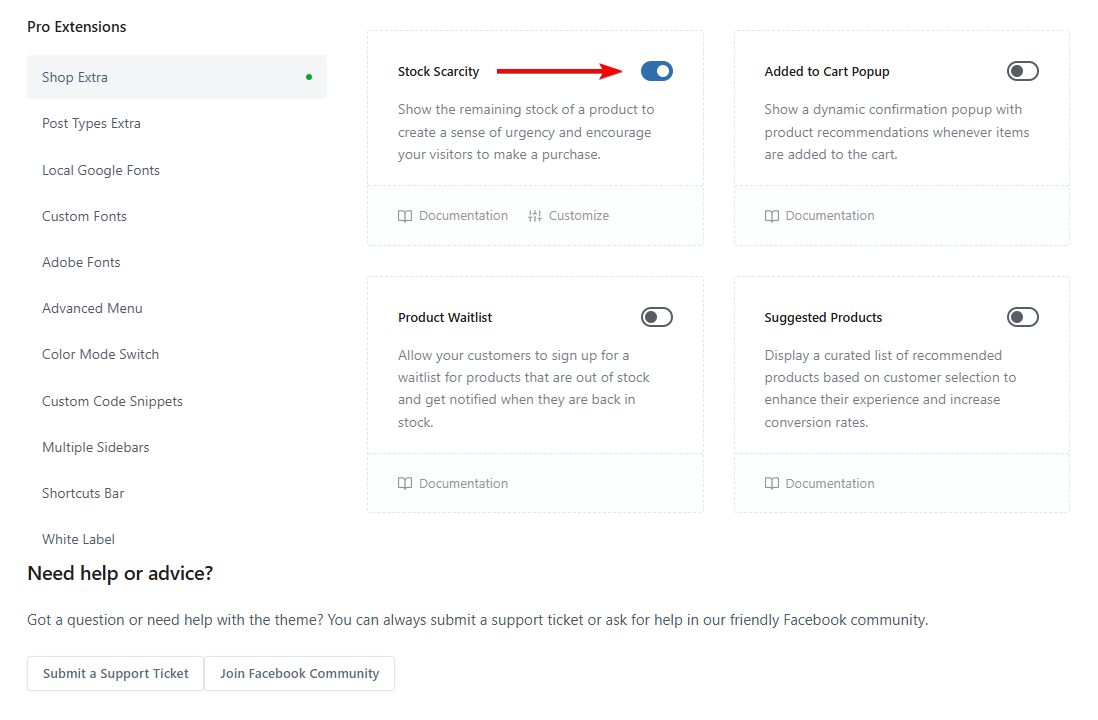
You can configure the feature in the Customizer under WooCommerce General to set thresholds, adjust the message, and fine-tune the appearance of the progress bar. You can also choose whether the alert appears on product archive pages, single product pages, or both, giving you full control over where scarcity messaging fits best within your shop’s design.
Step 6. Check Your Inventory Regularly & Refine Your Process
Even with a well-designed system, regular checks are necessary.
Review your inventory reports to see which items consistently sell well and which ones may need to be discounted or removed. Occasional physical stock checks help verify that your system matches reality and can uncover overlooked mistakes.
Use what you learn to improve your reordering patterns, update your product catalog, or reorganize your storage. Small refinements over time make your entire workflow more predictable and efficient.
When these steps work together, they form a stable and dependable inventory process. Your stock becomes easier to manage, your ordering becomes more accurate, and customers enjoy a smoother shopping experience from start to finish.
FAQs
What are the four types of inventory management?
The four main types are just-in-time (JIT), materials requirement planning (MRP), economic order quantity (EOQ), and days’ sales of inventory (DSI). Each approach helps businesses control stock levels in different ways. Stores choose the method that best matches their product range, demand patterns, and storage capacity to maintain balanced inventory and avoid waste.
What is the 80/20 rule in inventory?
The 80/20 rule suggests that around 20 percent of your products generate about 80 percent of your sales. This helps store owners identify their most valuable items. By focusing on these high performers, businesses can prioritize reordering, improve forecasting, and reduce time spent managing products that contribute less revenue.
Conclusion
Strong inventory management is foundational to running a smooth and dependable eCommerce store. When stock levels remain accurate and up to date, customers experience fewer delays, fewer cancellations, and a more reliable checkout process. This builds trust and helps create repeat buyers, which is essential for long-term growth.
Good inventory practices also give store owners better control over daily operations. With clear product organization, smarter forecasting, and consistent reordering habits, it becomes easier to avoid stockouts, reduce excess inventory, and manage cash flow responsibly. Even small improvements, such as turning on low-stock alerts or syncing sales channels, can remove a lot of manual work and prevent costly mistakes.
As your store expands across new channels or adds more products, these systems become even more important. Regular reviews and simple audits keep your data accurate, while ongoing refinements help you stay responsive to changes in demand.
By putting the right processes in place, your store becomes more efficient, fulfillment becomes more consistent, and you are better prepared to scale without unnecessary inventory challenges.
If you have any questions about ecommerce inventory management, let us know in the comments section below.