


Many WooCommerce stores focus on increasing traffic. But improving conversions is often easier.
And one of the most overlooked factors here is how customers actually complete their purchase.
Payment gateways play a big role in this. They affect how smooth your checkout feels, how much customers trust your store, and whether a payment goes through or fails.
Choose the wrong one, and you might end up paying higher fees, dealing with failed transactions, or losing customers right at the final step.
In this guide, we’ll break down how WooCommerce payment gateways work and how to choose the right one for your store based on factors like fees, location, security, and checkout experience.
What Is a WooCommerce Payment Gateway?
A WooCommerce payment gateway is a service that allows your store to accept and process payments online.
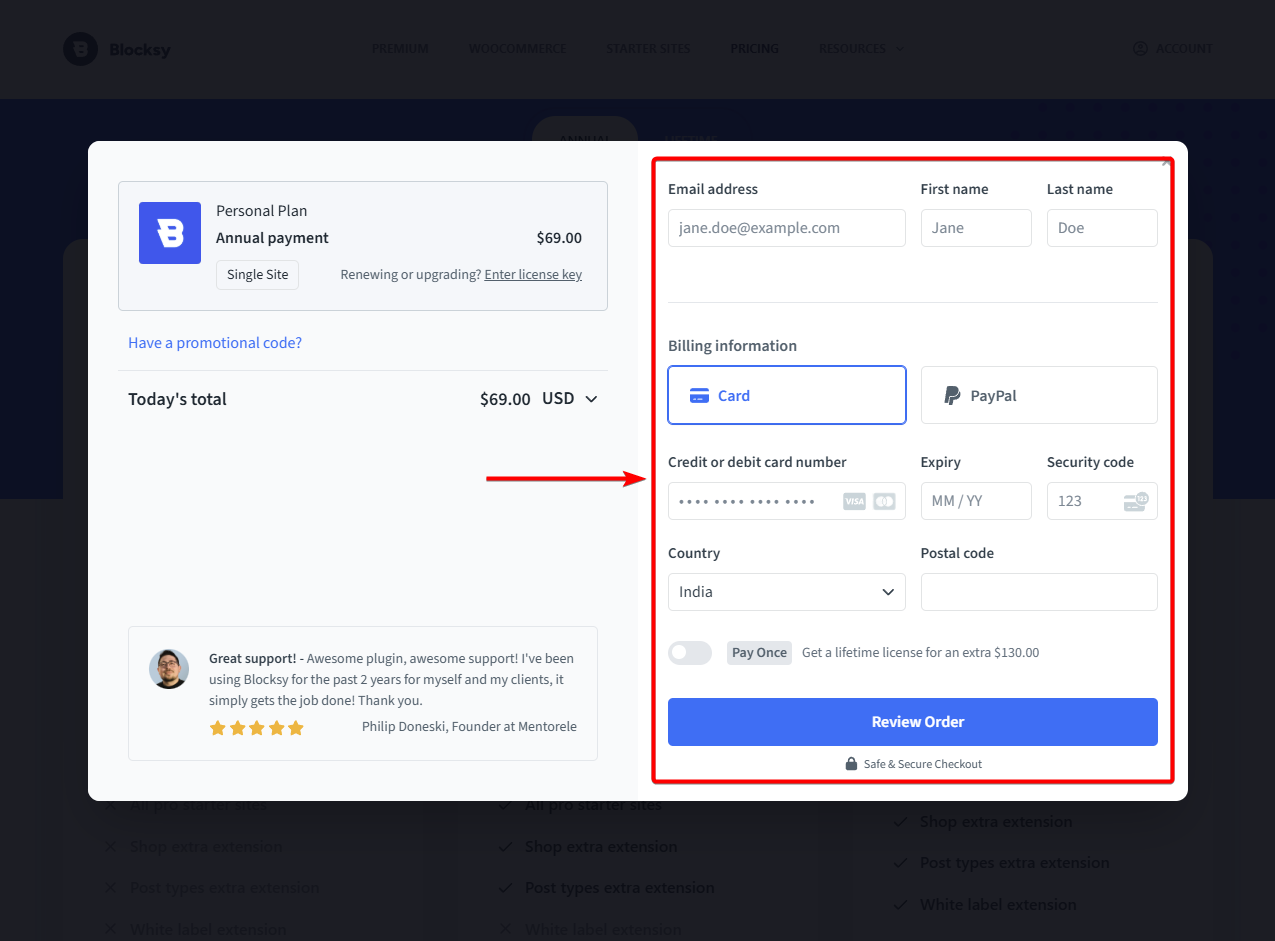
Some gateways are on-site. Customers enter their payment details and complete the purchase without leaving your store. Others are off-site. Customers are redirected to an external platform to finish the payment.
Both approaches work. On-site checkouts feel smoother, while off-site gateways often rely on brand trust.
Common examples include Stripe for on-site payments, PayPal for off-site checkout, and local providers like Razorpay or PayU for region-specific payment methods.
How WooCommerce Payment Gateways Work
When a customer places an order, their payment details are sent to the payment gateway. The gateway then communicates with the bank to approve or decline the transaction. If approved, the payment is confirmed, and the order is completed.
Behind the scenes, there are two parts involved.
- The payment gateway handles authorization.
- The payment processor moves the money between the customer’s bank and your account.
Fees and delays can happen at different stages. This includes authorization, currency conversion, and settlement – depending on the gateway and payment method used.
Key Factors to Consider When Choosing a Payment Gateway
Choosing a payment gateway is not just about fees. It affects how customers pay, how smooth your checkout feels, and how reliable your transactions are.
A good gateway makes payments feel effortless. A poor one can introduce friction at the final step and lead to abandoned checkouts.
Here are the key factors to consider:
Fees and pricing
Look beyond the basic transaction fee. Most gateways charge a percentage per transaction along with a fixed fee. You may also encounter currency conversion charges if you sell internationally.
Some providers include additional costs such as setup fees, monthly charges, or fees for refunds and chargebacks. These are easy to overlook but can add up over time.
Supported countries and currencies
Not all payment gateways are available in every country. Some are limited by business location, while others restrict where you can accept payments from.
If you sell internationally, make sure the gateway supports multiple currencies and can handle cross-border transactions smoothly. For local businesses, offering region-specific payment methods like UPI, wallets, or bank transfers can improve payment success rates and customer satisfaction.
Checkout experience
The checkout experience has a direct impact on conversions. The goal is to reduce friction. A clear, fast, and distraction-free checkout experience helps more customers complete their purchase.
On-site gateways allow customers to complete payments without leaving your store, which creates a smoother flow.
Off-site gateways redirect users to an external platform. While this can add an extra step, it can also increase trust if the platform is well-known.
Security and compliance
Payment gateways handle sensitive customer data, so security is essential. Look for PCI-compliant gateways that follow industry standards for data protection. Features like fraud detection, secure authentication, and encryption help reduce risk for both you and your customers.
Clear security signals during checkout can also build trust and make customers more comfortable completing their payment.
Integrations and compatibility
Your payment gateway should work seamlessly with WooCommerce and any plugins you use. This is especially important if your store relies on additional functionality.
For example, subscription-based stores need support for recurring payments. Other stores may require smooth refund handling or compatibility with extensions like memberships, bookings, or invoicing tools.
Choosing the right payment gateway comes down to balancing cost, customer experience, and reliability for your specific store.
Popular WooCommerce Payment Gateways
Stripe
Stripe is one of the most widely used WooCommerce payment gateways, especially for businesses selling globally. It offers an on-site checkout, allowing customers to complete payments without leaving your store, which helps reduce friction.
It supports major credit and debit cards, along with digital wallets like Apple Pay and Google Pay. Stripe also works well for subscription-based businesses, as it supports recurring payments and automated billing.
The main advantage is its smooth checkout experience and strong global support. However, Stripe is not available in all countries, and the setup process, including verification, can take time for new accounts.
PayPal
PayPal is one of the most recognized payment gateways and is widely trusted by customers worldwide. It typically works as an off-site gateway, redirecting users to PayPal’s platform to complete the payment. This can add an extra step but often increases trust, especially for first-time buyers.
It supports payments through PayPal balance, linked bank accounts, and cards. Setup is relatively simple, making it a popular choice for beginners.
There’s a strong brand recognition and ease of use. But PayPal’s fees can be higher than other gateways, and the redirect-based checkout may affect conversion rates for some stores.
Square

Square is a good option for businesses that sell both online and offline. It integrates with WooCommerce and syncs inventory between your website and physical point-of-sale system, making it useful for retail stores.
It supports card payments and offers a simple checkout experience for customers. Square also provides built-in tools for managing payments, refunds, and basic reporting from a single dashboard.
Square is only available in a limited number of countries, which makes it less suitable for fully global businesses.
Authorize.net
Authorize.net is a long-established payment gateway often used by larger or more established businesses. It supports both on-site and off-site payment options, giving store owners more flexibility in how they handle checkout.
It accepts major credit cards and offers features like recurring billing, fraud detection, and advanced security tools. This makes it a good fit for stores that need more control over payment processing.
The platform comes with setup complexity and additional costs, including monthly fees, which may not be ideal for smaller businesses.
Amazon Pay
Amazon Pay allows customers to complete purchases using their Amazon account, without creating a new account on your store. This makes checkout faster and more familiar, especially for users who already trust Amazon.
It works as an on-site experience with Amazon handling the payment in the background. Customers can use saved addresses and payment methods from their Amazon account, which reduces friction during checkout.
Customization options are limited, and they may not be available or widely adopted in all regions.
Local Payment Gateways (Razorpay, PayU, etc.)
Local payment gateways are designed for specific regions and are often the best choice if you primarily sell within a country. They support local payment methods such as UPI, net banking, and regional wallets, which many global gateways may not fully cover.
These gateways usually offer better payment success rates for local customers, as they are optimized for regional banking systems and user behavior. They may also provide faster settlements and local support.
Not ideal for global expansion, as support for international payments and currencies can be limited.
FAQs
Which payment gateway is best for WooCommerce?
There is no single best option. Stripe works well for global businesses with on-site checkout. PayPal adds trust, especially for new customers. Local gateways are better for region-specific payments. The right choice depends on your location, target audience, and whether you need features like subscriptions or multi-currency support.
Can I use multiple payment gateways?
Yes. WooCommerce allows you to offer multiple payment gateways at the same time. This gives customers more flexibility to choose how they want to pay. It also improves conversion rates, as different users prefer different methods like cards, wallets, or local payment options.
What are the cheapest payment gateways?
The cheapest gateway is not always the one with the lowest transaction fee. You also need to consider currency conversion charges, refund fees, and payment success rates. A slightly higher fee with better reliability can result in more successful transactions and higher overall revenue for your store.
Conclusion
Payment gateways do more than just process payments. They shape your checkout experience, influence customer trust, and directly impact your conversion rates.
There is no single “best” option. The right gateway depends on where you sell, who your customers are, and how they prefer to pay.
Focus on reliability, ease of use, and offering the right payment options for your audience. A smooth checkout experience can make the difference between a completed purchase and a lost sale.