
URLs help both users and search engines understand what a page is about before they even visit it.
A clean, descriptive URL gives visitors more confidence when clicking a link and helps search engines better understand the context of a page.
On the other hand, long or confusing URLs can make content harder to read, share, and maintain. URLs filled with random numbers or unclear words often create a poor user experience and offer little SEO value.
Fortunately, WordPress gives users full control over how URLs are structured through its permalink settings. You can create short, readable URLs that are easier to manage and more aligned with SEO best practices.
In this guide, we’ll explain what makes a URL SEO-friendly, how WordPress permalink structures work, and how to optimize your URLs without hurting existing rankings.
What Exactly Are SEO-Friendly URLs?
SEO-friendly URLs are readable URLs that clearly describe the content of a page for both users and search engines.
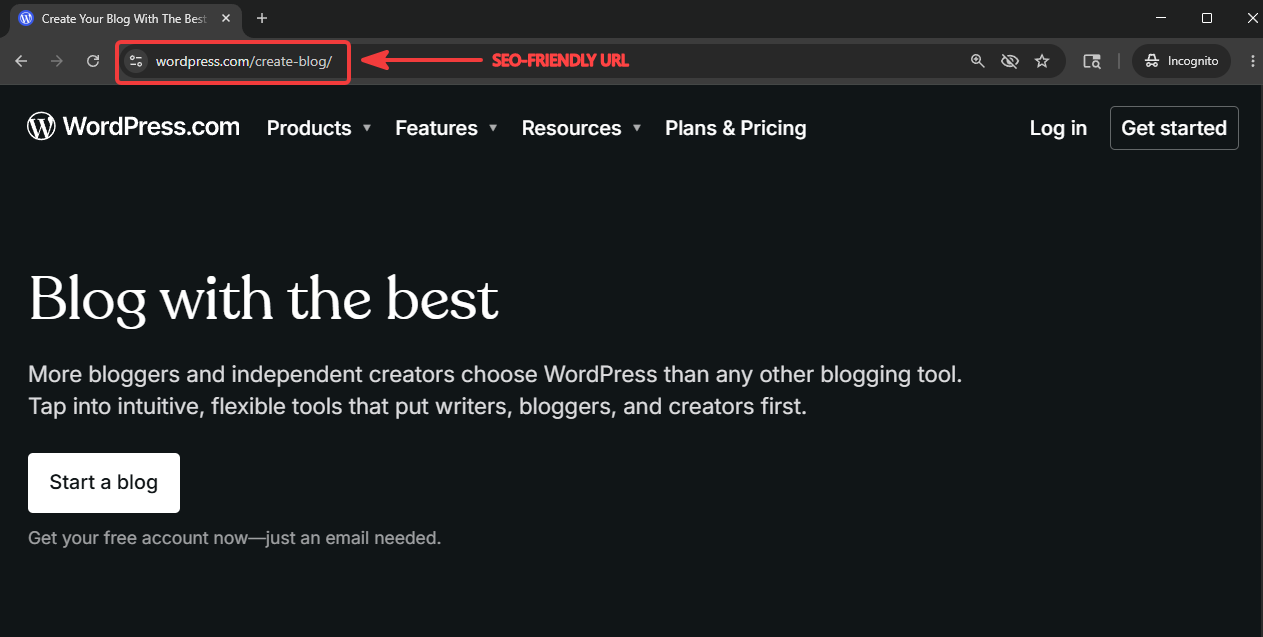
Instead of using random numbers or confusing parameters, they use simple words that explain what the page is about.
For example, a URL like example.com/wordpress-seo-tips is much easier to understand than example.com/p=123?ref=seo.
Descriptive URLs help search engines better understand page context and make it easier for users to know what to expect before clicking a link. They also improve readability, make links easier to share, and create a cleaner site structure overall.
SEO-friendly URLs are a small part of WordPress SEO, but they can have a noticeable impact on both search visibility and user experience over time.
Characteristics of an SEO-Friendly URL
Not all URLs are equally useful for SEO or usability. Some URLs immediately explain what a page is about, while others create confusion for both users and search engines.
SEO-friendly URLs usually follow a few simple best practices that improve readability, organization, and long-term maintainability.
Short and Descriptive URLs
Short URLs are easier to read, remember, and share. They also help users and search engines quickly understand what a page is about without unnecessary words or clutter.
For example:
- Recommended:
example.com/wordpress-seo-tips - Not recommended:
example.com/blog/category/seo/article-2456
Removing unnecessary words and folders keeps URLs cleaner and easier to manage over time.
Natural Keyword Usage
Relevant keywords help describe page content more clearly and improve contextual relevance. Including a primary keyword in the URL can also reinforce what the page is about.
However, keywords should appear naturally instead of making the URL look repetitive or stuffed.
For example:
- Recommended:
example.com/wordpress-image-optimization - Not recommended:
example.com/wordpress-seo-image-seo-optimization-tips
Clear and readable URLs are usually more effective than trying to force multiple keywords into a single slug.
No Dates or Unnecessary Numbers
Dates and random numbers can make URLs look outdated or confusing, especially when content gets updated over time.
For example:
- Recommended:
example.com/wordpress-seo-guide - Not recommended:
example.com/2022/10/wordpress-seo-guide
Random numbers and IDs also add unnecessary clutter without helping users understand the page content.
And even if the content is updated regularly, older dates in URLs may discourage users from clicking because the page appears outdated.
That said, date-based URL structures can still make sense for news websites, magazines, and publishing platforms where publication timing is important to readers.
Simple URL Structure
A simple URL structure improves navigation, organization, and overall usability across the website. It also makes links easier to maintain long-term.
For most websites, shorter URL structures are usually more effective than deeply nested ones.
For example:
- Recommended:
example.com/seo-checklist - Not recommended:
example.com/blog/marketing/seo/guides/beginner/seo-checklist
Overly complex URLs can become difficult to manage as websites grow.
No Unnecessary Special Characters or Parameters
Long strings of symbols and parameters can make URLs difficult to understand and may appear less trustworthy to users.
For example:
- Recommended:
example.com/wordpress-speed-optimization - Not recommended:
example.com/index.php?id=728&ref=category&source=google
Cleaner URLs are easier to share, easier to scan in search results, and generally create a better user experience.
Consistent URL Formatting
Consistent URL formatting helps create a cleaner and more organized website structure.
For example, constantly mixing category-based URLs, date-based URLs, and different slug styles across the same website can create inconsistency and confusion.
For example:
- Recommended:
example.com/blog/wordpress-seo-tipsexample.com/blog/woocommerce-speed-guide
- Not recommended:
example.com/2024/seo-tipsexample.com/blog/woocommerce-speed-guideexample.com/category/tutorial?id=52
Using a predictable structure across the site makes URLs easier to manage and helps maintain a more professional appearance overall.
How to Create SEO-Friendly URLs in WordPress
WordPress includes built-in URL settings called permalinks that control how URLs are structured across the website. These settings affect every post, page, category, and archive URL on your site.
For example:
- Permalink structure:
example.com/%postname%/ - URL:
example.com/wordpress-seo-tips
To change permalink settings in WordPress, go to the WordPress dashboard → Settings → Permalinks.
WordPress offers several built-in permalink structures, including plain, day and name, month and name, numeric, post name, and custom structure.
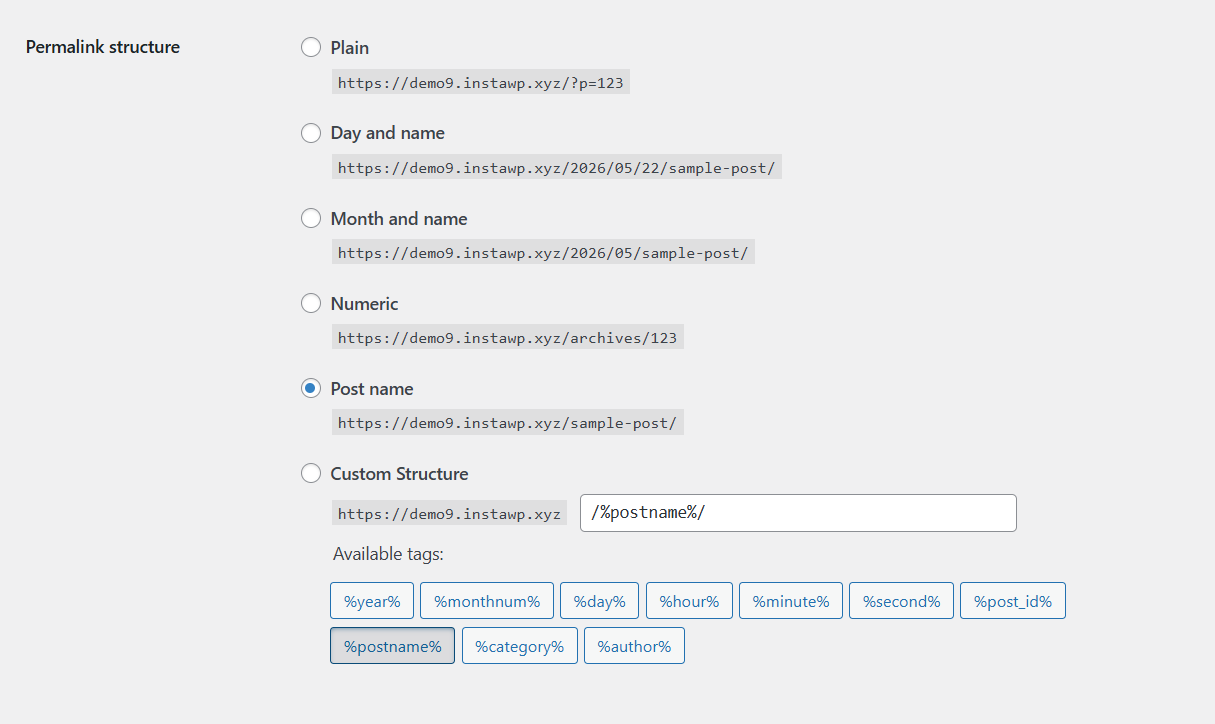
For most WordPress websites, the “Post name” structure is usually the best option because it keeps URLs short, descriptive, and easy to read.
However, the right structure can also depend on the type of website you run:
- Date-based structures can work well for news and publishing websites where freshness matters
- Category-based URLs may be useful for ecommerce stores or large blogs with clearly organized content sections
- Simple post-name URLs are often ideal for small business websites, portfolios, and general blogs
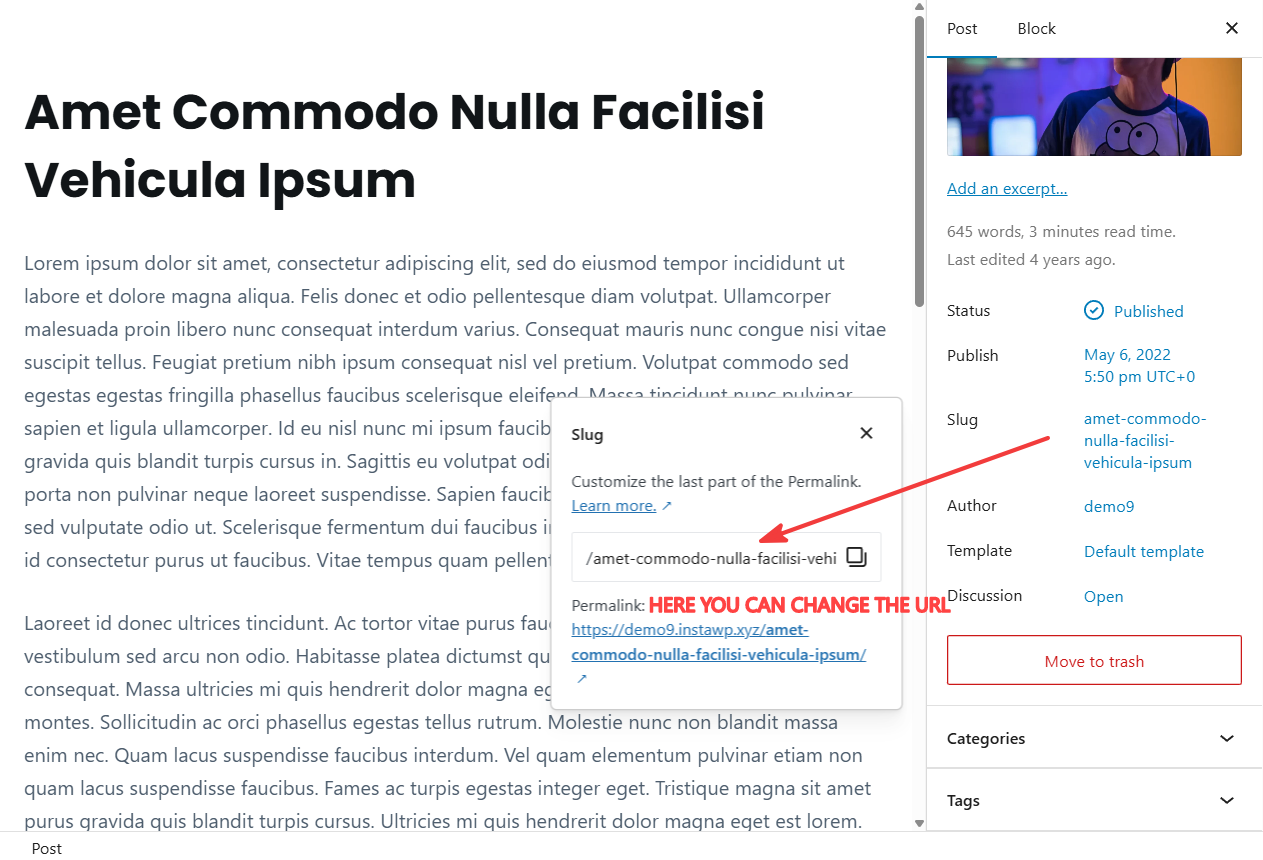
You can also edit the URL for individual posts and pages directly inside the WordPress editor. This gives you more control over how each URL appears.
Can You Change URLs Without Hurting SEO?
Changing URLs after a page has already been published can affect rankings, backlinks, and existing traffic if not handled correctly. Since URLs are meant to stay permanent, unnecessary changes can create SEO issues over time.
However, there are situations where updating URLs still makes sense, such as:
- Removing dates from old URLs
- Cleaning up long or confusing slugs
- Updating outdated permalink structures
- Consolidating duplicate or overlapping pages
In these cases, redirects become extremely important.
A 301 redirect tells search engines and visitors that a page has permanently moved to a new URL. This helps preserve existing SEO value and prevents users from landing on broken pages.
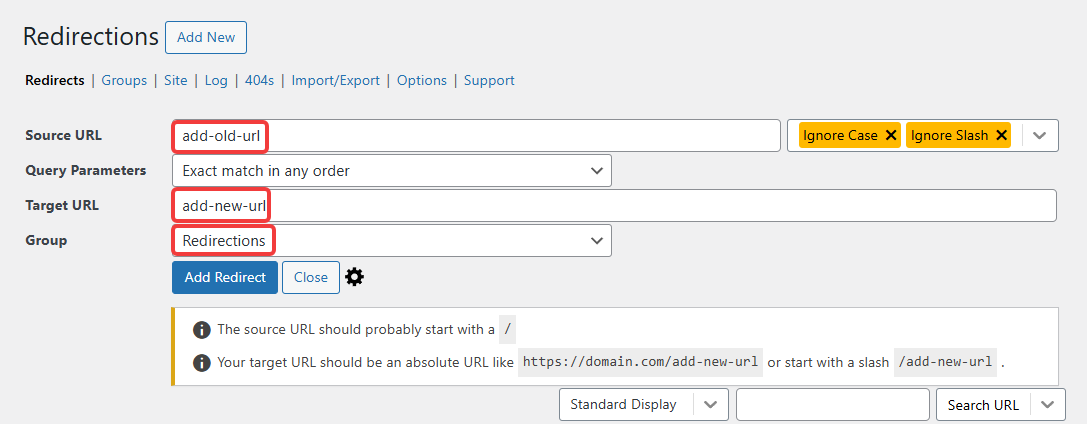
For example:
- Old URL:
example.com/2022/10/wordpress-seo-guide - New URL:
example.com/wordpress-seo-guide
Without a redirect, visitors clicking the old URL may see a 404 error page instead.
WordPress redirect plugins make it easier to safely manage redirects when updating URL structures or changing slugs.
Once your URL structure is properly set up, it’s usually best to keep it stable and avoid making frequent changes.
FAQs
What is the difference between URL, slug, and permalink?
A URL is the complete web address used to access a page on the internet. For example, in example.com/wordpress-seo-guide, the entire address is the URL.
A permalink, short for “permanent link,” is the fixed URL structure WordPress uses for pages and posts. It defines how URLs are organized across the website. For example, a permalink structure like example.com/%postname%/ tells WordPress to use the post title in the URL.
A slug is the final, unique part of the URL that identifies a specific page or post. In the URL example.com/wordpress-seo-guide, the slug is wordpress-seo-guide.
These three terms are closely related. The permalink structure controls the format of URLs, while the slug defines the individual page address within that structure.
Should you include categories in WordPress URLs?
Including categories in URLs can improve organization and help users better understand site structure, especially on large blogs or ecommerce websites. However, category-based URLs can also become longer and harder to manage. Smaller websites often benefit more from shorter, simpler URL structures without categories.
Does URL length affect SEO?
URL length is not a major ranking factor, but shorter URLs are generally easier to read, share, and remember. Long URLs with unnecessary words, numbers, or parameters can reduce clarity and usability. Keeping URLs concise and descriptive usually creates a better experience for both users and search engines.
Conclusion
SEO-friendly URLs improve both search visibility and user experience by making pages easier to understand, navigate, and share. Clean, descriptive URLs also help create a more organized and maintainable website structure over time.
WordPress makes it relatively easy to optimize URLs through its permalink settings and editable slugs. Small improvements like shorter URLs, natural keyword usage, and cleaner formatting can make a noticeable difference.
At the same time, maintaining a stable URL structure is just as important. Frequent URL changes can create SEO and usability issues if redirects are not handled properly.
A simple, consistent URL structure is usually the best long-term approach for both users and search engines.