

Customers do not want to browse through endless product categories. Most head straight to the search bar and expect fast, accurate results.
Default WooCommerce search struggles to meet these expectations – results are often limited, filtering options are basic, and the overall experience can feel slow or frustrating on mobile devices.
A good product search experience helps customers find products quickly, navigate large catalogs more easily, and complete purchases with less friction.
Features like live AJAX search, SKU search, advanced filters, and mobile-friendly search UX can make a noticeable difference.
This article covers what a good WooCommerce product search looks like and how to achieve it using features already available in the Blocksy Theme.
Why Optimize WooCommerce Product Search?
Customers using search often have higher purchase intent. They already know what they want and are trying to find it quickly.
The problem is that the default WooCommerce search is fairly limited and struggles to meet modern ecommerce expectations, especially as product catalogs grow.
Some common limitations include:
- Only searches basic product fields like titles and descriptions
- Weak relevance ranking, where less relevant products may appear first
- No live AJAX search or autocomplete suggestions
- No built-in SKU search
- Limited filtering and faceted navigation options
- Poor search UX on mobile devices
These limitations create friction during product discovery. Customers may struggle to narrow down results, find exact products, or navigate large catalogs efficiently.
Optimizing WooCommerce product search helps solve these problems. A better search experience can:
- Help customers find products faster
- Make large catalogs easier to navigate
- Surface more relevant products
- Reduce unnecessary clicks and page reloads
- Improve mobile shopping experience
- Reduce abandonment caused by poor search results
Good product search is not just a convenience feature. It plays a direct role in product discovery, store navigation, and overall ecommerce UX.
Characteristics of A Good WooCommerce Product Search
Customers expect ecommerce search to work more like Amazon than a basic WordPress search bar. They want fast results, useful filtering options, and the ability to find products with minimal effort.
These are some of the features expected from a good WooCommerce product search.
Live AJAX search: Results appear instantly as customers type, without requiring a full page reload. This makes product discovery feel faster and more interactive, especially for larger catalogs.
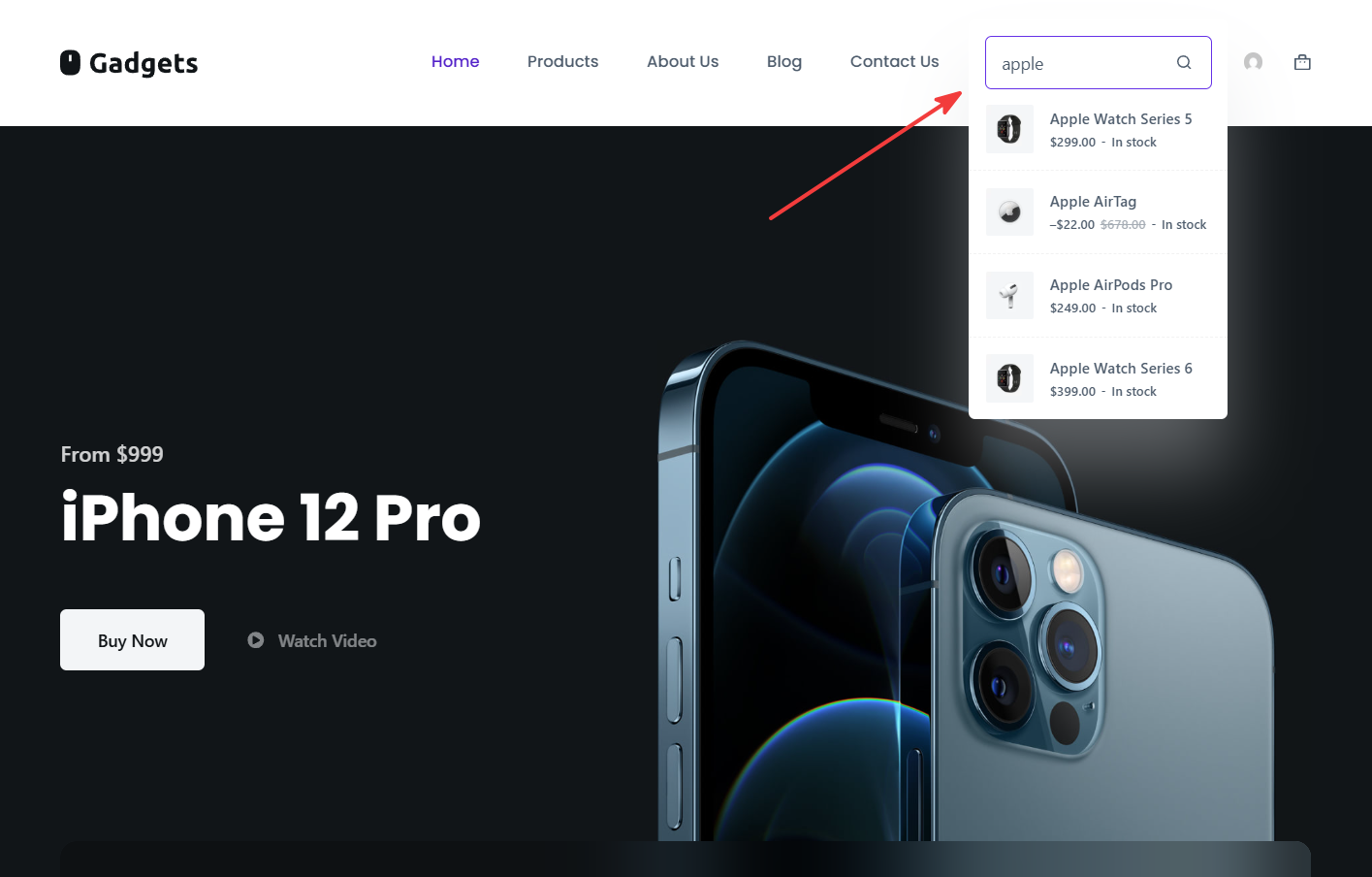
Product details inside search results: Search overlays should display useful information like product images, prices, ratings, and short descriptions. Customers can quickly decide whether a product is relevant before opening the product page.
Taxonomy-based search filters: Customers should be able to narrow search results by category, brand, size, color, material, or other product attributes. This becomes increasingly important as catalogs grow.
SKU search: Many repeat customers, wholesalers, and B2B buyers search using product codes or SKUs instead of product names. SKU search helps them find exact products immediately.
Catalog filters: Price filters, rating filters, and attribute filters help reduce overwhelming result sets into something manageable. This improves navigation for stores with many similar products.
Mobile-friendly search UX: Search overlays, autocomplete suggestions, and filters should work smoothly on smaller screens. Mobile shoppers should be able to search and refine results without dealing with cluttered navigation.
Overall, the modern WooCommerce product search should reduce the effort required to find products.
How to Set Up WooCommerce Product Search with Blocksy
Many of the search features modern ecommerce stores need can be set up directly within Blocksy Pro, without relying on multiple third-party search plugins.
Blocksy includes built-in search elements, AJAX search functionality, SKU search support, and a dedicated product filter suite for WooCommerce stores.
The goal is not just to add a search bar. It is to create a search experience that helps customers find products quickly and navigate large catalogs with less friction.
1. Choose Where and How Search Appears on Store
The first step is deciding where search should appear and how visible it needs to be within your store navigation. Different search elements work better for different types of catalogs and shopping behaviors.
Add Search to the Header
A search icon in the header makes product search available from anywhere on your store without taking up much space in the navigation.
With Blocksy’s Header Builder, you can add a search icon directly to the header. When customers click it, a search field opens and displays live results as they type.

Open your Customizer and go to Header → Search.
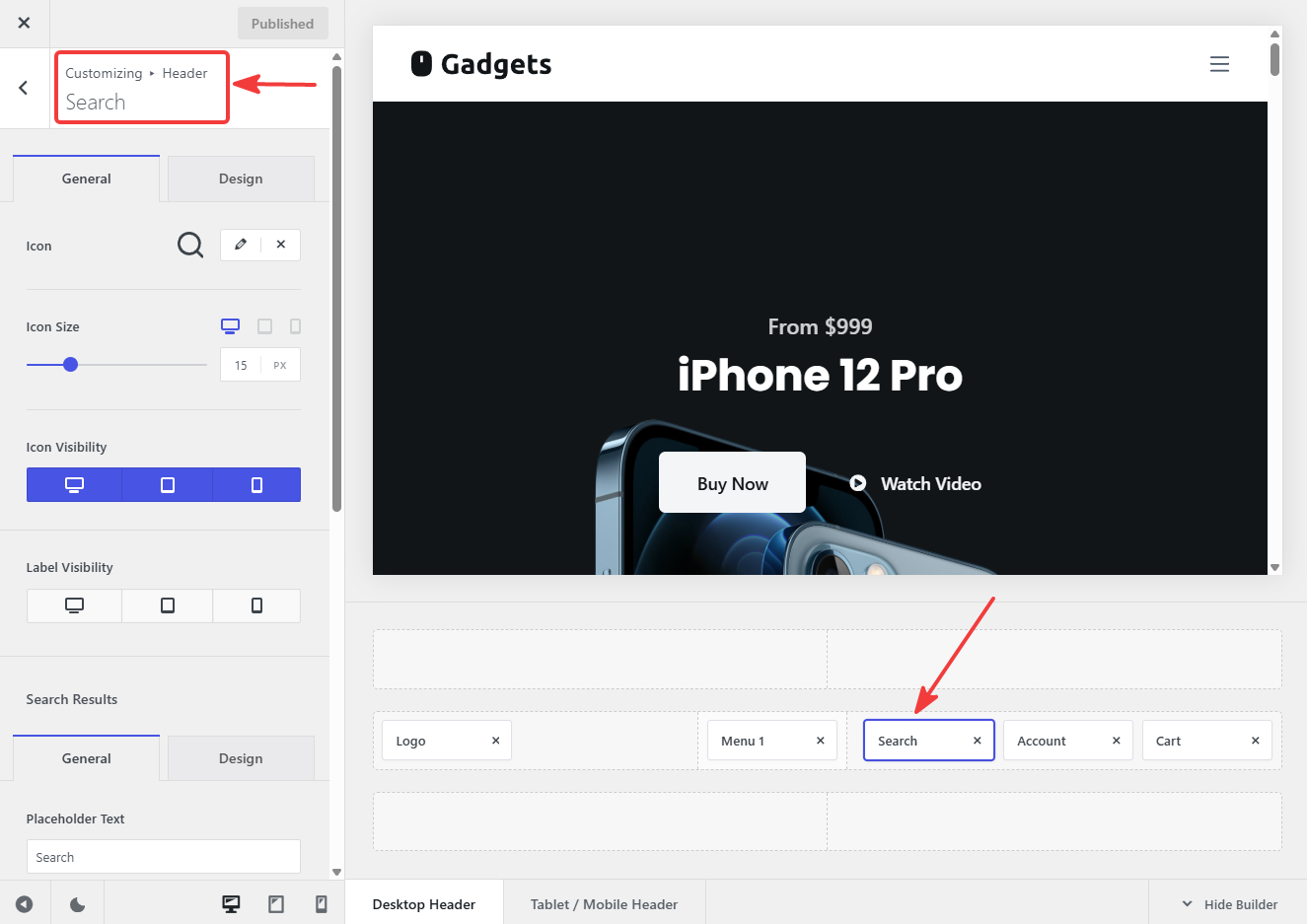
You can toggle on options like Live Results, Live Results Images, Live Results Product Price, and Live Results Product Status.
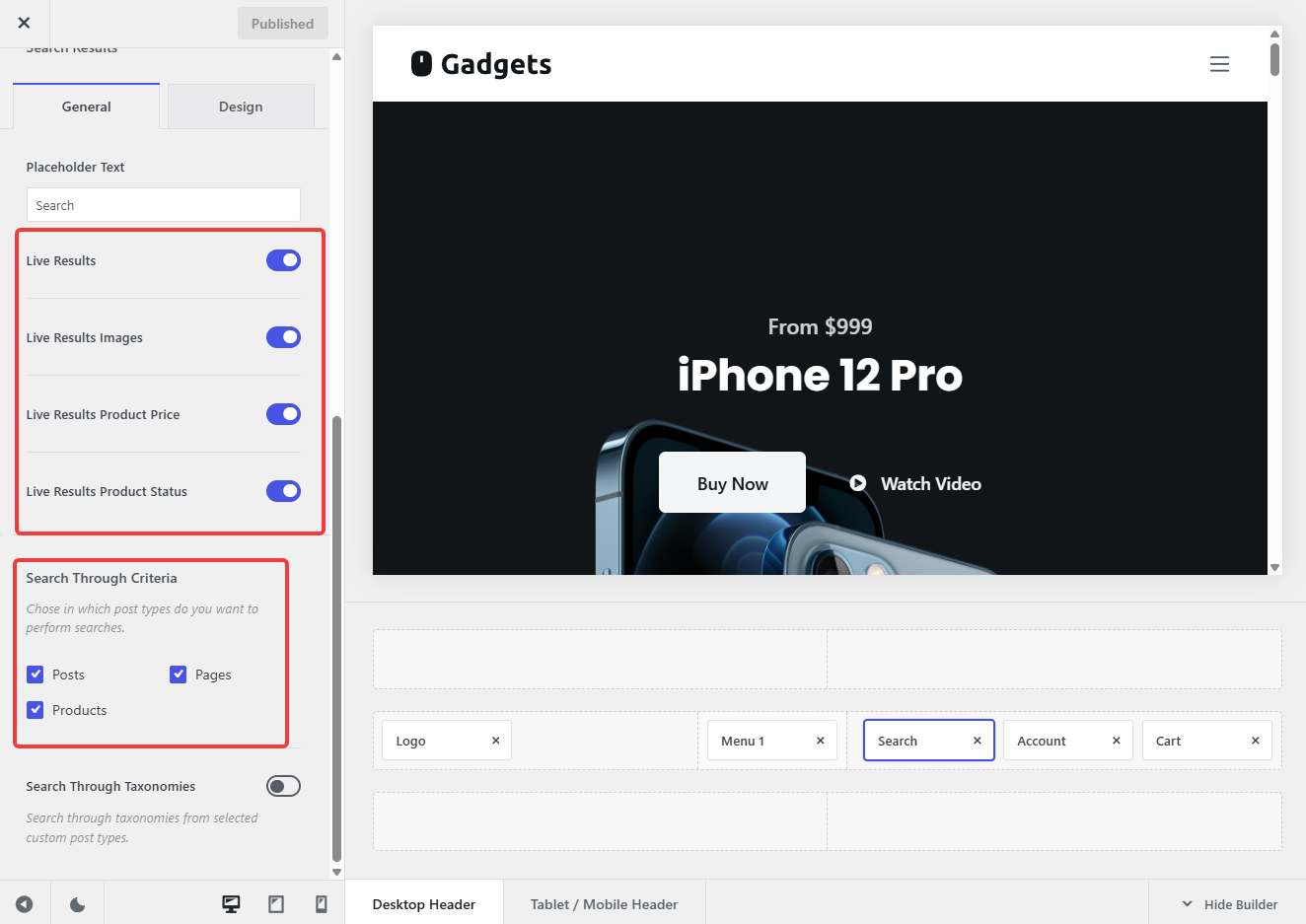
This will allow customers to see product images, prices, and matching products instantly, helping them find what they’re looking for without leaving the current page.
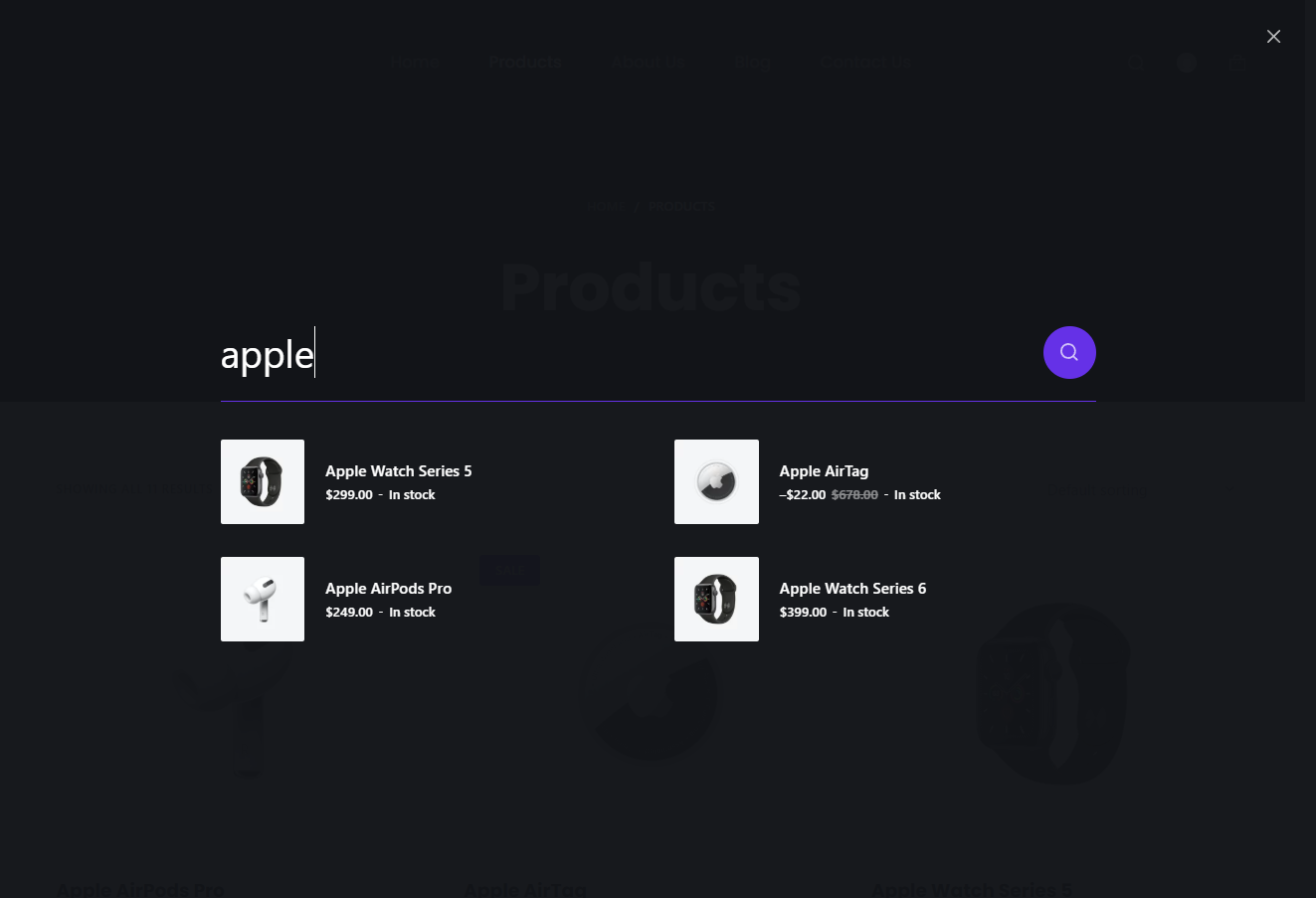
Blocksy also includes a dedicated Search Box element. This keeps the search field visible in the header at all times and allows customers to narrow searches by category before they start typing.
Add Search to Shop Pages and Sidebars
While header search works well for most stores, some stores benefit from placing the search closer to where customers are actively browsing products.
Blocksy’s Advanced Search Block can be added to shop pages, sidebars, dedicated search pages, or any other location using the block editor. This makes the search more visible and accessible without requiring customers to return to the header.
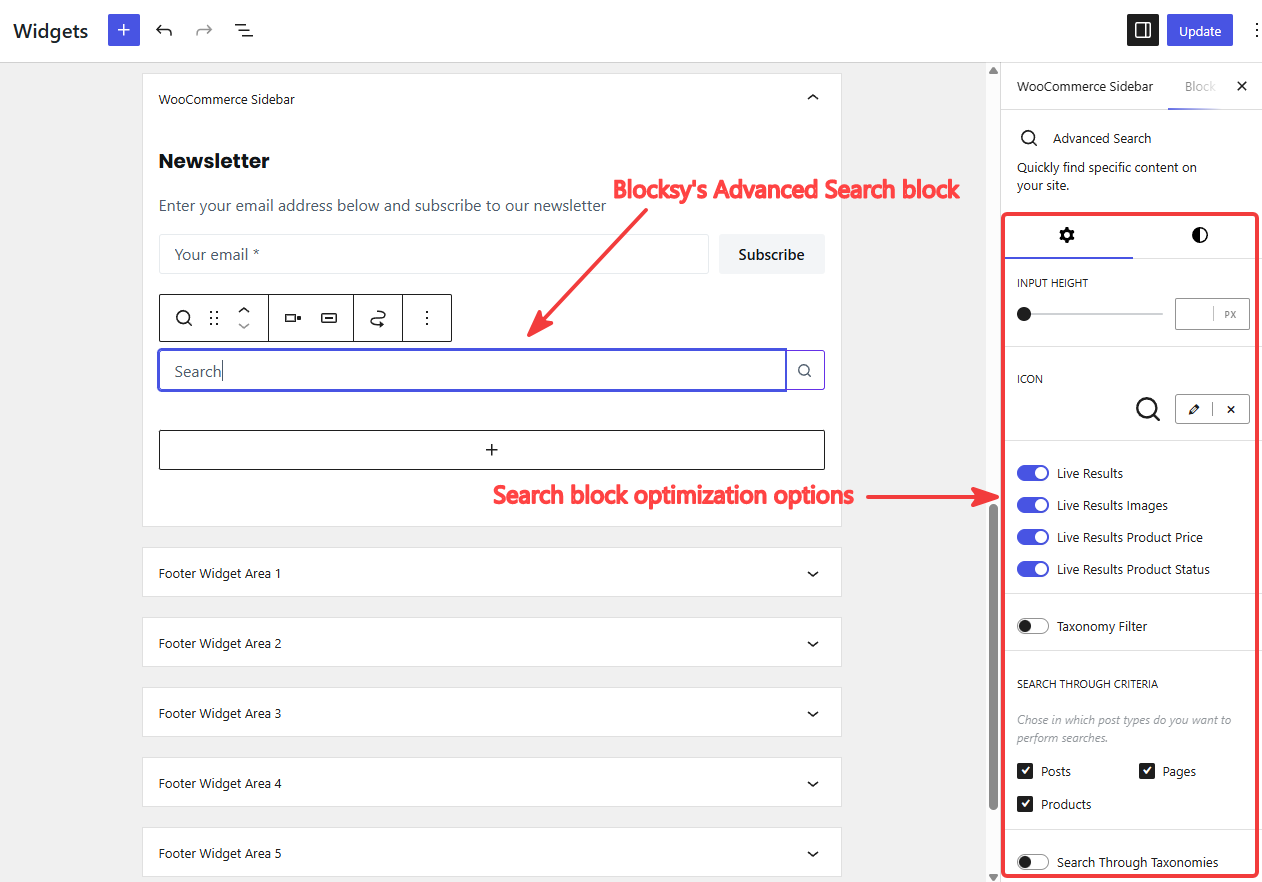
It also supports category filters and post type restrictions, allowing you to keep search results focused on WooCommerce products instead of blog posts or other content.
This approach works particularly well for larger stores, content-heavy WooCommerce sites, or stores where search plays a central role in product discovery.
2. Help Customers Find Exact Products Faster
Not every customer starts with a broad search. Some already know exactly what they want and simply need the fastest path to that product.
This is common in B2B stores, electronics stores, parts catalogs, wholesale stores, and among repeat customers who are familiar with product codes.
Add SKU Search
SKU search allows customers to find products using a product code instead of a product name. This eliminates unnecessary browsing and helps customers reach the correct product more quickly.
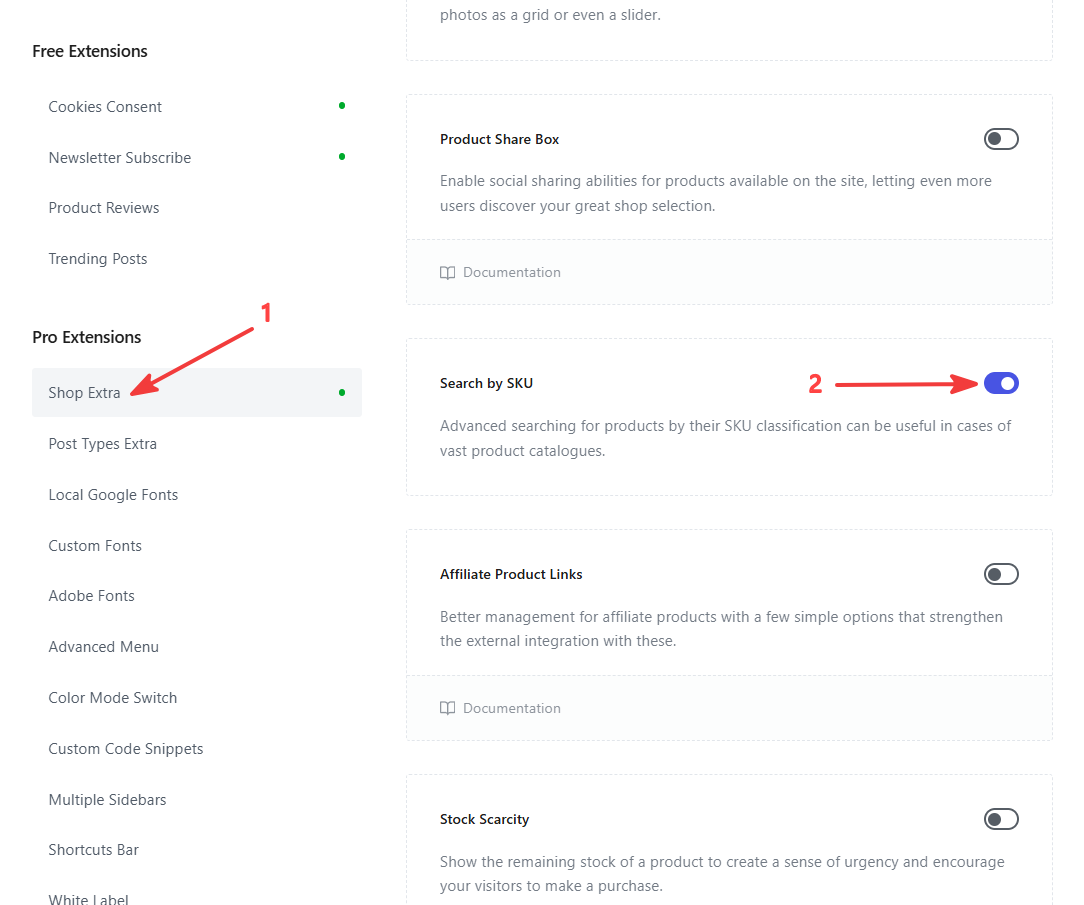
Blocksy Pro includes built-in SKU search support through the Shop Extra extension. Once enabled, SKU search works across all Blocksy search elements, including header search, the Search Box, and the Advanced Search block.
To enable it, go to Blocksy Dashboard → Extensions → Shop Extra. Enable the Search by SKU option.
3. Help Customers Narrow Down Large Catalogs
Search helps customers find products they already have in mind. But when shoppers are still exploring options, filters become just as important.
Without filters, customers may have to scroll through dozens or even hundreds of products to find what they need. This becomes especially frustrating in stores with many categories, product variations, or price points.
Blocksy Pro includes a built-in WooCommerce filter system that helps customers narrow down results and focus on the products most relevant to them.
The sections below cover the most useful filter types and how they help customers narrow down product listings.
Enable Product Filters
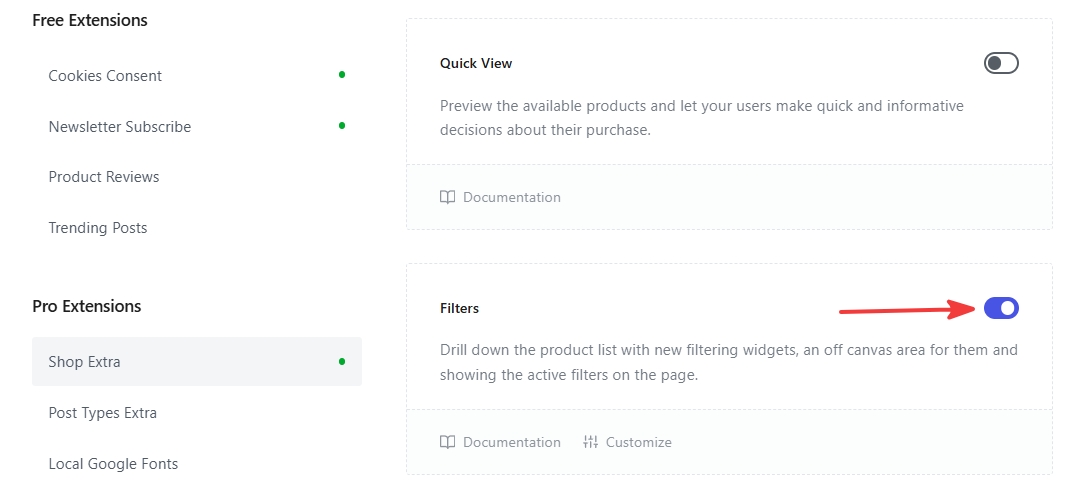
Before adding individual filters, you’ll need to enable the Filters module. Go to Blocksy Dashboard → Extensions → Shop Extra → Filters and activate the module.
Add Category and Attribute Filters
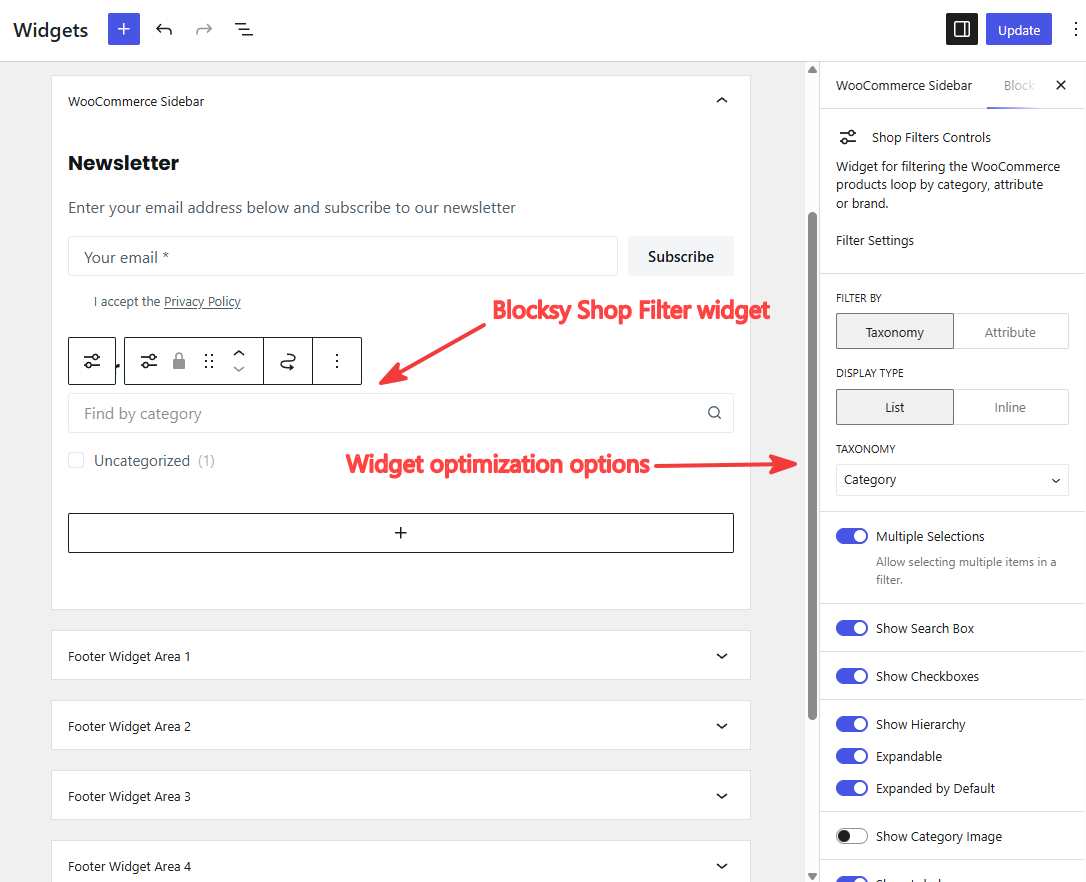
Category and attribute filters allow customers to refine products based on criteria such as size, color, brand, material, or other custom attributes.
For example, a customer shopping for shoes may want to view only products in a specific size and color. Instead of scrolling through the entire catalog, they can narrow down the product list in a few clicks.
This is particularly useful for fashion stores, furniture stores, electronics stores, and any catalog with multiple product variations.
To add these filters in Blocksy, place the Shop Filters widget in your shop sidebar or filter area and choose which attributes to display.
Add Price and Rating Filters
Customers often use price and ratings to narrow down options when comparing similar products.
A price filter is useful when customers have a specific budget in mind. Blocksy’s Filter by Price widget includes an interactive slider that allows shoppers to quickly narrow products to a preferred price range. Results update instantly, making it easier to browse large catalogs without repeatedly refreshing the page.
Ratings provide another way to evaluate products. For stores with many competing products, a Filter by Rating helps shoppers focus on highly rated items and eliminate lower-rated options from consideration. Blocksy allows you to display products matching an exact rating or products rated at or above a selected value.
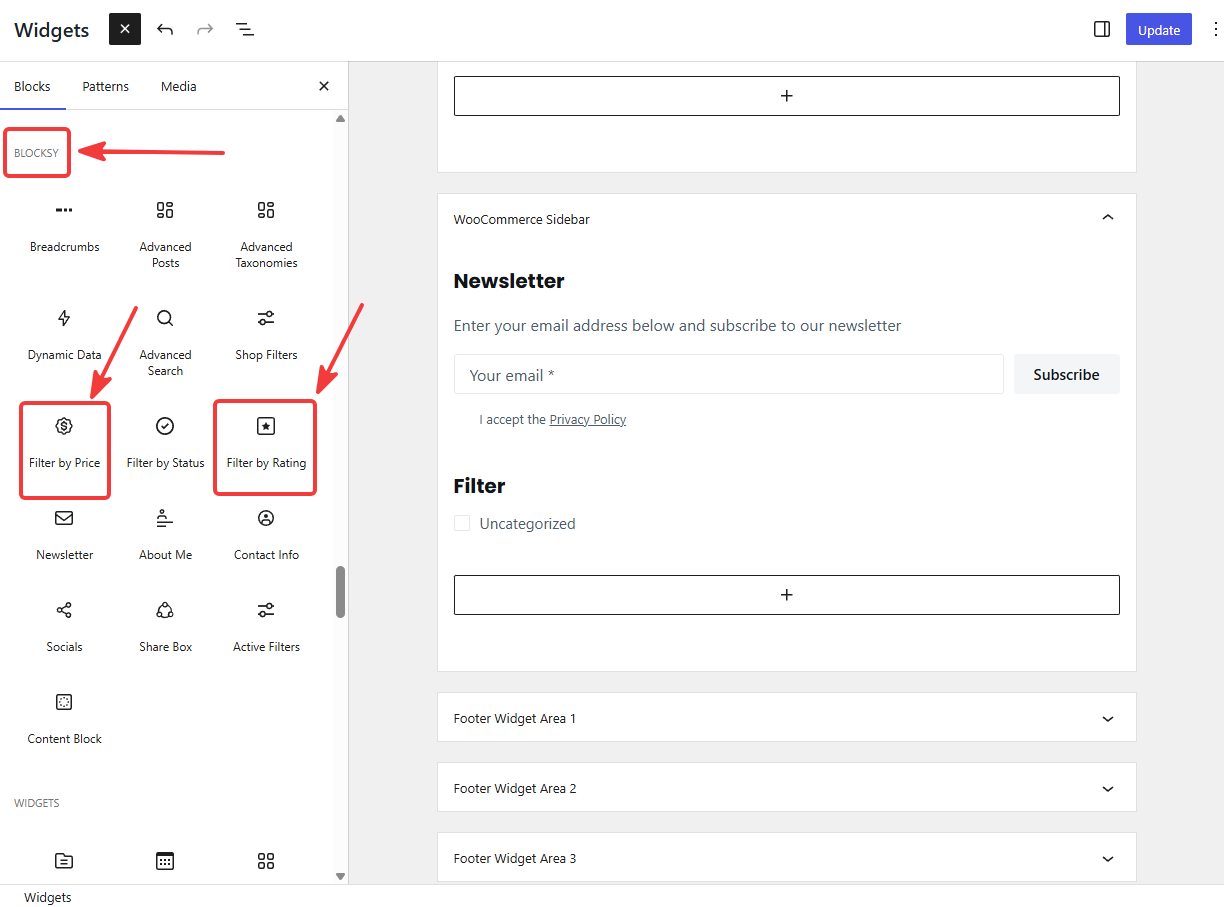
Blocksy Filters are most effective when they match how customers shop. By combining category, attribute, price, and rating filters, you can reduce friction, improve product discovery, and help customers reach purchase decisions more quickly.
Choosing the Right Search Set Up for Your Store
Small catalogs: If your store only has a limited number of products, a simple header search is often enough. Live search results with product images and prices help customers find products quickly without adding unnecessary complexity.
Medium-sized catalogs: As catalogs grow, search becomes a more important navigation tool. Keeping a search field visible in the header and adding filters for categories, attributes, and price can help customers narrow down products more efficiently.
Large catalogs and B2B stores: Stores with hundreds of products often benefit from combining multiple search features. Search by SKU helps customers find exact products, while filters make it easier to refine large result sets and compare similar items.
Stores with products and content: If your site includes blog posts, guides, or documentation alongside products, it’s helpful to keep product search focused on products only. This prevents non-product content from cluttering search results and makes product discovery more efficient.
The goal is to match the search experience to how customers actually shop.
FAQs
What is the difference between default WooCommerce search and AJAX search?
Default WooCommerce search reloads the page after a customer submits a query. AJAX search displays live results instantly while customers type, without reloading the page. This creates a faster and smoother shopping experience, especially for larger product catalogs where customers need quick access to products and filters.
Can WooCommerce search products by SKU, attributes, and categories?
WooCommerce does not fully support advanced product search by default. With Blocksy Pro, customers can search products using SKUs and narrow down results using category, price, rating, and attribute filters. This is especially useful for stores with large catalogs, technical products, or multiple product variations.
Does optimizing WooCommerce search improve conversions?
Better WooCommerce product search reduces friction during product discovery. Features like live AJAX search, filters, SKU search, and mobile-friendly search UX help customers find products faster and navigate catalogs more efficiently. This can improve engagement, reduce abandonment, and increase the likelihood of completing a purchase.
Conclusion
Default WooCommerce search is not designed for growing product catalogs, and the limitations become more noticeable as stores scale.
Poor search experiences make it harder for customers to find products quickly, especially on mobile devices or stores with many similar products.
Good WooCommerce product search goes beyond a basic search bar. Features like live AJAX results, SKU search, taxonomy filters, price filters, and mobile-friendly search UX help customers navigate stores more efficiently and reduce friction during product discovery.
The good news is that most of these features can be implemented directly within Blocksy Pro without relying on multiple third-party search plugins.
The right search setup ultimately depends on your catalog size, customer behavior, and how central search is to the shopping experience in your store.