



The Conditional Module controls where and when supported Blocksy features are displayed. It lets you target specific pages, post types, taxonomies, WooCommerce content, users, dates, request data and other contextual criteria without creating separate implementations for every scenario.
The module is used throughout Blocksy, including areas such as:
- Conditional Headers
- Conditional Footers
- Multiple Sidebars
- Content Blocks
- Trending Posts
- Shortcuts Bar
- Other Blocksy features that expose display conditions.
How Conditions Work
Each condition describes a situation in which the associated Blocksy feature should be displayed. You can target broad areas such as the entire website or all single posts, or narrow the rule down to a specific page, taxonomy term, product, user state or request.
Basic Mode
For straightforward setups, conditions can be added individually to describe the areas where the feature should apply. This works well when you only need a simple set of inclusion or exclusion rules.
Advanced Mode
Advanced Mode lets you group multiple conditions together using AND logic. This makes it possible to build more precise relationships between otherwise separate rules.
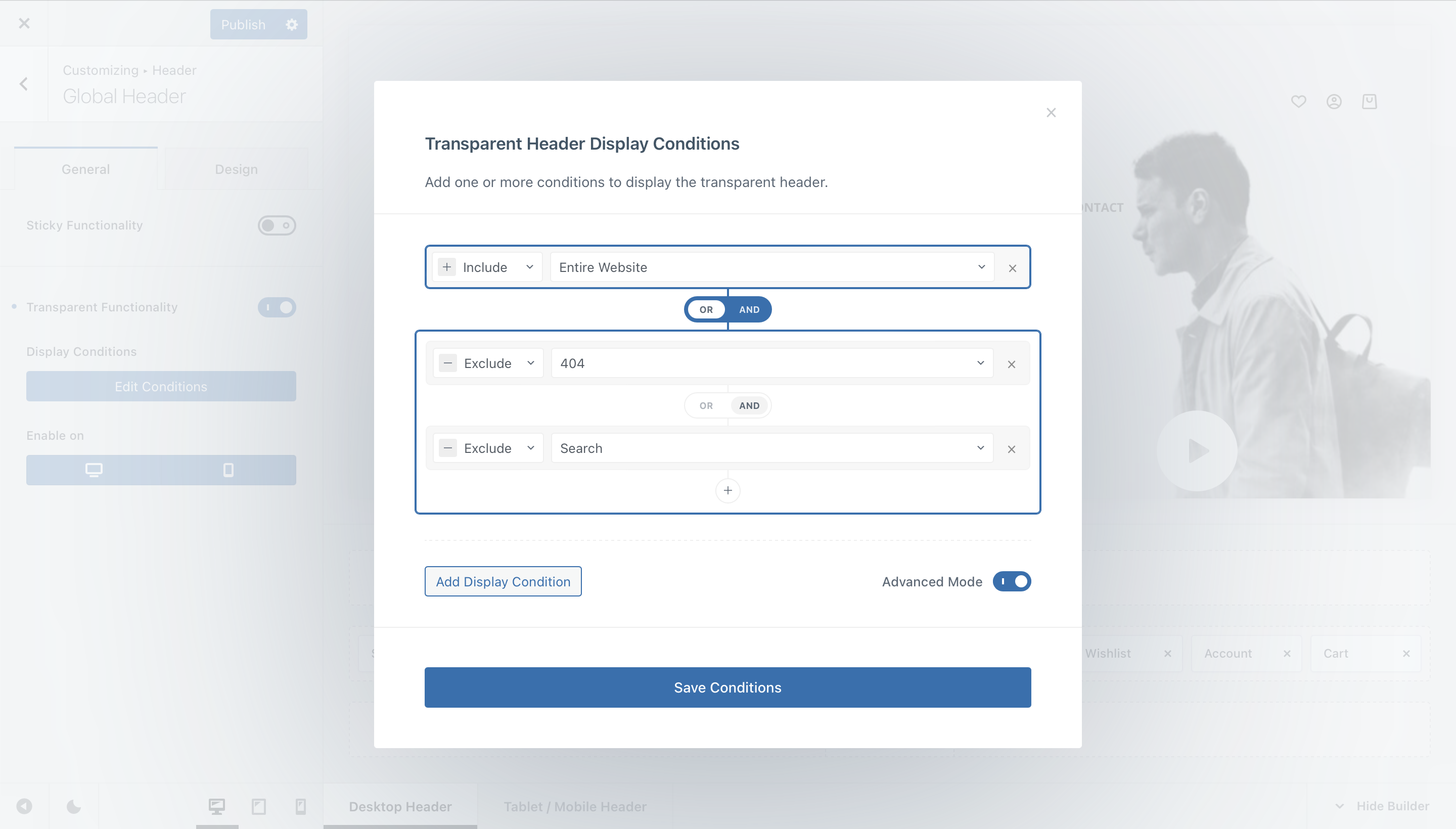
For example, a configuration can be structured so that a feature appears when Condition A is true, or when both Condition B and Condition C are true together:
Example logic
Condition A OR (Condition B AND Condition C)
This makes it possible to combine broad fallback rules with more specific grouped conditions inside the same configuration.
Available Condition Types
The exact list of conditions can vary depending on the plugins, post types and taxonomies registered on your website. Common condition groups include the following.
Content & Archives
Target broad or specific areas of the site’s content hierarchy, including:
- The entire website.
- All singular content or all archives.
- Posts, pages and their archive views.
- Categories, tags and other taxonomies.
- Custom Post Types and their archives.
- Individual posts, pages or Custom Post Type entries.
WooCommerce
When WooCommerce is active, conditions can target areas such as the Shop page, individual products, product archives, product categories, tags, attributes, brands and specific products or taxonomy relationships.
Visitor Conditions
Supported Blocksy features can also be targeted according to the current visitor, including whether the visitor is logged in or logged out and, where available, their WordPress user role.
Date & Time
Time-based conditions can restrict a feature to a specific date and time range or to recurring days of the week.
Request Conditions
For more advanced targeting, conditions can inspect information from the current request:
- Request Referer – target visitors based on the referring source.
- Request Cookie – evaluate the presence or value of a cookie.
- Request URL – target requests matching a particular URL pattern or value.
Condition Reference
The table below summarises the most common conditions available in the Conditional Module. Additional conditions can appear when compatible plugins, Custom Post Types or taxonomies are registered on the website.
| Condition | Effect |
|---|---|
| Entire Website | Applies the feature across the entire website. |
| Basic | |
| All Singulars | Targets all singular content, including posts, pages, products and supported Custom Post Types. |
| All Archives | Targets all supported archive views. |
| Posts | |
| Post Archives | Targets post archive views. |
| Post Categories | Targets post category archive pages. |
| Post Tags | Targets post tag archive pages. |
| Single Post | Targets all individual blog posts. |
| Pages | |
| Single Page | Targets all regular WordPress pages. |
| 404 | Targets the site’s 404 page. |
| Search | Targets search results pages. |
| Blog | Targets the page assigned as the Posts page in WordPress. |
| Front Page | Targets the page assigned as the site’s front page. |
| Privacy Policy Page | Targets the page assigned as the WordPress Privacy Policy page. |
| Author Archives | Targets author archive pages. |
| WooCommerce | |
| Shop Home | Targets the page assigned as the WooCommerce Shop page. |
| Single Product | Targets all individual product pages. |
| Product Archives | Targets supported WooCommerce product archive pages. |
| Product Categories | Targets product category archives. |
| Product Attributes | Targets product attribute archive pages. |
| Product Brands | Targets product brand archives when supported. |
| Product Tags | Targets product tag archives. |
| Single Product ID | Targets one specific product. |
| Single Product with Taxonomy ID | Targets products assigned to a specific supported taxonomy term. |
| Taxonomy ID | Targets a specific WooCommerce taxonomy archive. |
| Custom Post Types | |
| CPT Name Single | Targets all singular entries belonging to the selected Custom Post Type. |
| CPT Name Archives | Targets archive views belonging to the selected Custom Post Type. |
| Specific | |
| Post ID | Targets one specific post. |
| Page ID | Targets one specific page. |
| Custom Post Type ID | Targets one specific entry belonging to a Custom Post Type. |
| Post with Taxonomy ID | Targets posts assigned to a specific taxonomy term. |
| Post with Author ID | Targets posts assigned to a specific author. |
| Taxonomy ID | Targets the archive page for a specific taxonomy term. |
| Archive Loop Specific | |
| Archive Item with Taxonomy ID | Targets individual post cards inside an archive when the post belongs to a specific taxonomy term. |
| WooCommerce Archive Item with Taxonomy ID | Targets individual product cards inside an archive when the product belongs to a specific supported taxonomy term. |
| Date & Time | |
| Range Date/Time | Applies the feature only within a specified date and time range. |
| Recurring Days | Applies the feature on selected recurring days of the week. |
| Requests | |
| Request Referer | Evaluates the referring source of the current request. |
| Request Cookie | Evaluates a cookie associated with the current request. |
| Request URL | Evaluates the URL of the current request. |
Available conditions depend on your website
Custom Post Types, taxonomies, WooCommerce features and other integrations can add additional choices to the Conditional Module. The options visible on one installation may therefore differ from another.