



WordPress and WooCommerce have long offered featured image options for posts and products, respectively. These images act as visual representatives, appearing in post archives, social media shares, and potentially as hero banners atop your content. But what if you could showcase something even more dynamic?
Blocksy Pro takes things a step further by introducing featured image video thumbnails. This powerful feature allows you to replace static images with captivating videos, instantly grabbing user attention and injecting a touch of dynamism into your website.
Blocksy Pro caters to your preferences when it comes to video sources. You can:
- Embed Locally Hosted Videos: Upload your videos directly to your WordPress media library, ensuring complete control and flexibility over your content.
- Leverage YouTube or Vimeo Links: Seamlessly integrate videos hosted on popular platforms like YouTube or Vimeo, expanding your content possibilities without requiring additional storage space on your own server.
Technical Details for Locally Hosted Videos
For those opting to host videos locally on your server, here are some recommendations to ensure smooth playback and a consistent user experience across devices:
- MP4 Container Format: The MP4 format is widely recognized and offers optimal compatibility across various devices. We recommend using MP4 as the container format for your featured image videos.
- Video and Audio Codecs: Within the MP4 container, it’s crucial to utilise codecs that are extensively supported. Here’s the recommended combination:
- Video Track: H.264 codec – This codec ensures broad device compatibility for the video portion of your featured image video thumbnails.
- Audio Track: AAC codec – Similarly, the AAC codec guarantees wide support for the audio track of your videos.
Balancing Resolution and File Size
While you have control over factors like resolution and bitrate, it’s important to strike a balance. High resolutions offer superior visual quality, but they also result in larger file sizes. Consider your server’s capabilities and user internet speeds. Large files can take longer to load, potentially impacting user experience. Finding the right balance between quality and file size will ensure smooth video playback for your visitors.
Integrating a Featured Video for a Post
Incorporating a video thumbnail into your posts is a breeze. Simply navigate to the familiar featured image section within your post editor. You’ll notice a new addition: a play button icon! Click on this icon to seamlessly select a featured video from your media library or external sources. This intuitive interface makes it easier than ever to leverage the power of video content and enhance your website’s visual appeal.
You can choose any video from the media gallery, or even upload a new one. There are also a few options that might come in handy, such as having the video autoplay, having it loop over and over again and disabling playback controls.
Integrating a Featured Video for a Product
Here, the story is very similar, with the same set of options available for WooCommerce products. The addition here is that we also support adding a featured video to one of the product gallery images, not just the main featured image.
Video Embedding Options
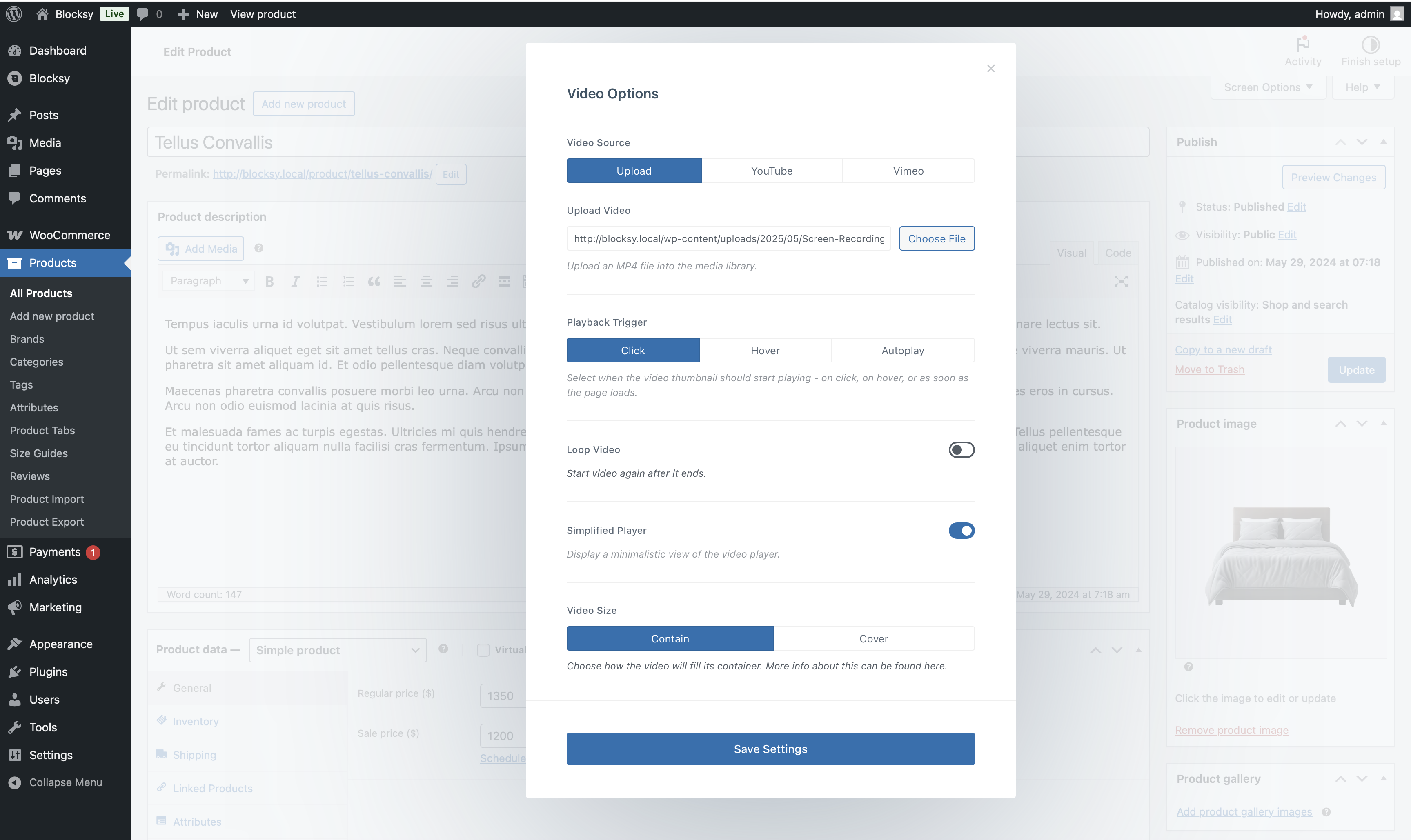
Blocksy empowers you to go beyond static images for your featured thumbnails. When embedding a video, you’re presented with a range of options to configure playback and presentation:
- Playback Trigger: Set your video to begin playing automatically as soon as the page loads, when the user hovers their mouse cursor over the thumbnail, or by executing a simple click action.
- Loop Video: Ensure your video seamlessly repeats on a loop, keeping your content engaging until the user chooses to pause it.
- Simplified Player: Opt for a minimalist approach with the simplified player. This option hides the original player controls, displaying a clean play/pause button for a more streamlined visual experience.
The Video Size Option
When using the simplified player, the video size option allows you to control how your video adapts to the featured image container. This is particularly relevant when the video’s aspect ratio (e.g., widescreen) differs from the image thumbnail’s aspect ratio (e.g., portrait). Here’s how the two video size options work:
- Contain: This option prioritizes displaying the entire video within the container. However, black borders may appear around the video if there’s a mismatch between the aspect ratios.
- Cover: This option automatically crops the video to perfectly fit the aspect ratio of the image thumbnail, ensuring a seamless visual presentation. While some video content might be cropped, it eliminates any black borders.
These options are available for all video source types – locally hosted videos, YouTube and Vimeo.