



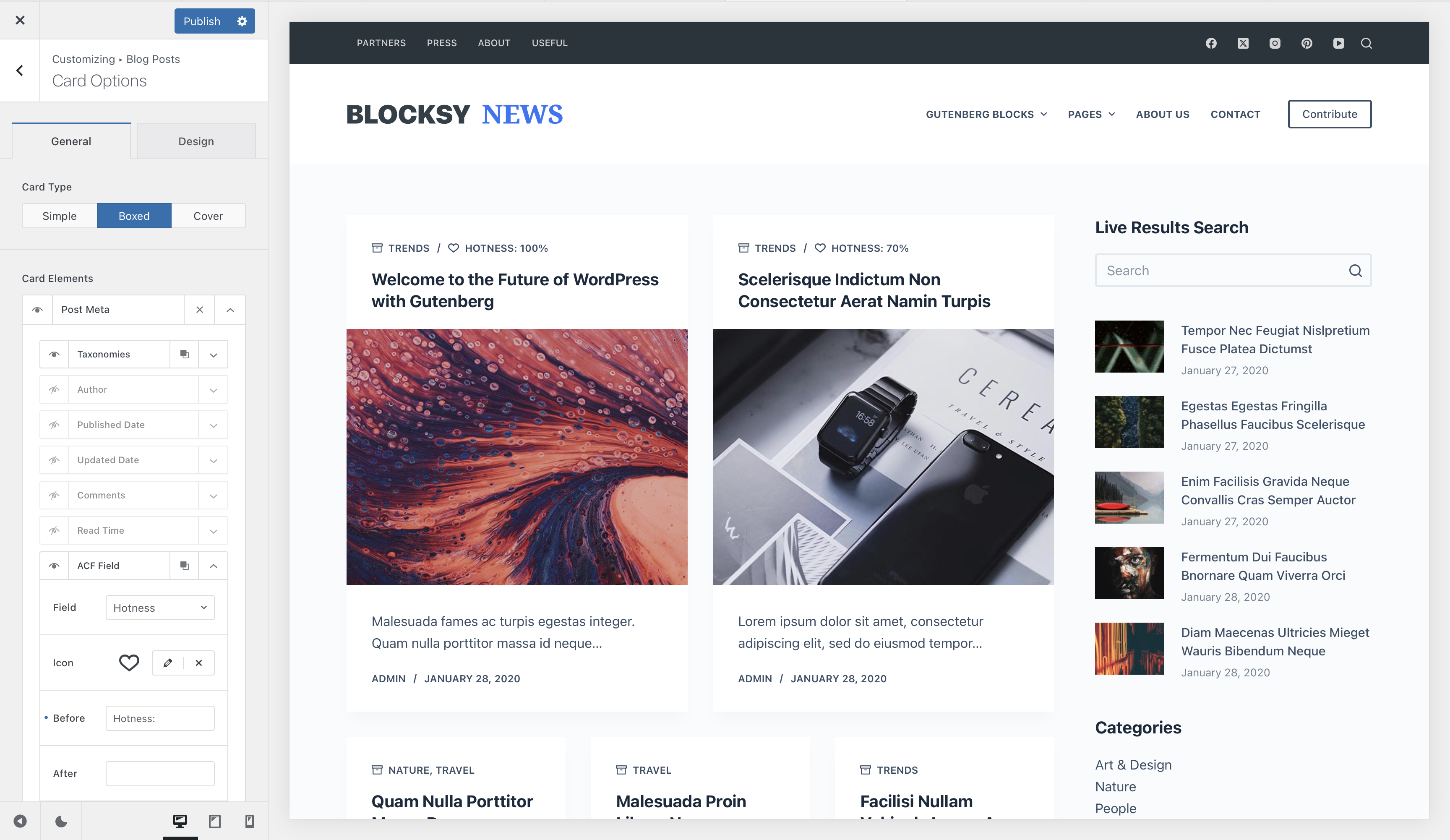
The Dynamic Data module from Post Types Extra integrates supported custom field solutions with Blocksy. This allows information stored in custom fields to be used in compatible post meta elements, Content Blocks and Blocksy’s dynamic-content tools.
It can be used with regular posts, pages, Custom Post Types and supported taxonomy contexts, depending on where your custom fields have been assigned.
Post Types Extra required
The custom field integration described in this article requires the Dynamic Data module from Post Types Extra, available with the Business and Agency Blocksy Pro plans.
Looking for the Gutenberg block?
This article covers the Post Types Extra Dynamic Data module and its custom-field integrations. For the Gutenberg block and its content-source, image and query-loop controls, see the Dynamic Data block documentation.
Getting Started
- Install and configure one of the supported custom field solutions.
- Create your custom fields and assign them to the required posts, pages, Custom Post Types or taxonomy terms.
- Navigate to WordPress Dashboard → Blocksy → Extensions.
- Locate Post Types Extra and enable its Dynamic Data module.
- Add values to the custom fields on the content entries where they should be used.
- Select those fields from compatible Blocksy dynamic-data or post-meta controls.
Supported Custom Field Providers
Post Types Extra integrates with the following custom field solutions:
The custom field plugin remains responsible for creating, storing and assigning the data. Post Types Extra provides the integration that lets supported Blocksy features retrieve those values.
Using Custom Fields in Blocksy
Post Meta
Custom fields can be used in compatible Blocksy post-meta areas, allowing additional information to appear alongside standard metadata such as the publication date, author or taxonomy terms.
This is useful for concise structured information such as a project date, location, difficulty level or another value that belongs to the current entry.
Dynamic Data Block
Enabling the Post Types Extra integration also makes supported custom fields available to Blocksy’s Dynamic Data block.
This provides greater control over how the value is displayed and makes custom fields especially useful when building layouts with Content Blocks, Advanced Posts or the native WordPress Query Loop.
Content Block Templates
Custom fields can be incorporated into Custom Single Templates and Custom Archive Templates to create layouts that automatically adapt to the current entry.
When working inside a Content Block, select an appropriate entry from the Content Block’s preview controls. Using an entry that already contains the required fields lets the editor detect those fields and display representative values while you build the template.
Taxonomy Custom Fields
Post Types Extra can also detect supported custom fields assigned to taxonomy terms. This makes it possible to store additional information directly on categories, tags or custom taxonomy terms and retrieve it in compatible dynamic-content contexts.
The taxonomy must be properly registered and the custom field provider must assign the relevant fields to that taxonomy before Blocksy can expose their values.
For Blocksy’s own built-in term image and Accent Color options, see the Taxonomy Customisations documentation.
Custom fields not appearing?
Make sure the custom field provider is active, the Dynamic Data module is enabled under Blocksy → Extensions → Post Types Extra, and the field is assigned to the content type currently being edited or previewed. When working with a Content Block, select a preview entry that contains the field and a saved value.