



Blocksy includes several built-in performance optimisations and also provides a dedicated panel for controlling how some of them behave. These options let you fine-tune CSS delivery, remove WordPress’ legacy emoji script, serve Gravatars locally and control native lazy loading for images generated by the theme.
To access these options, navigate to Customiser → General Options → Performance.
Quick Look

Granular Controls
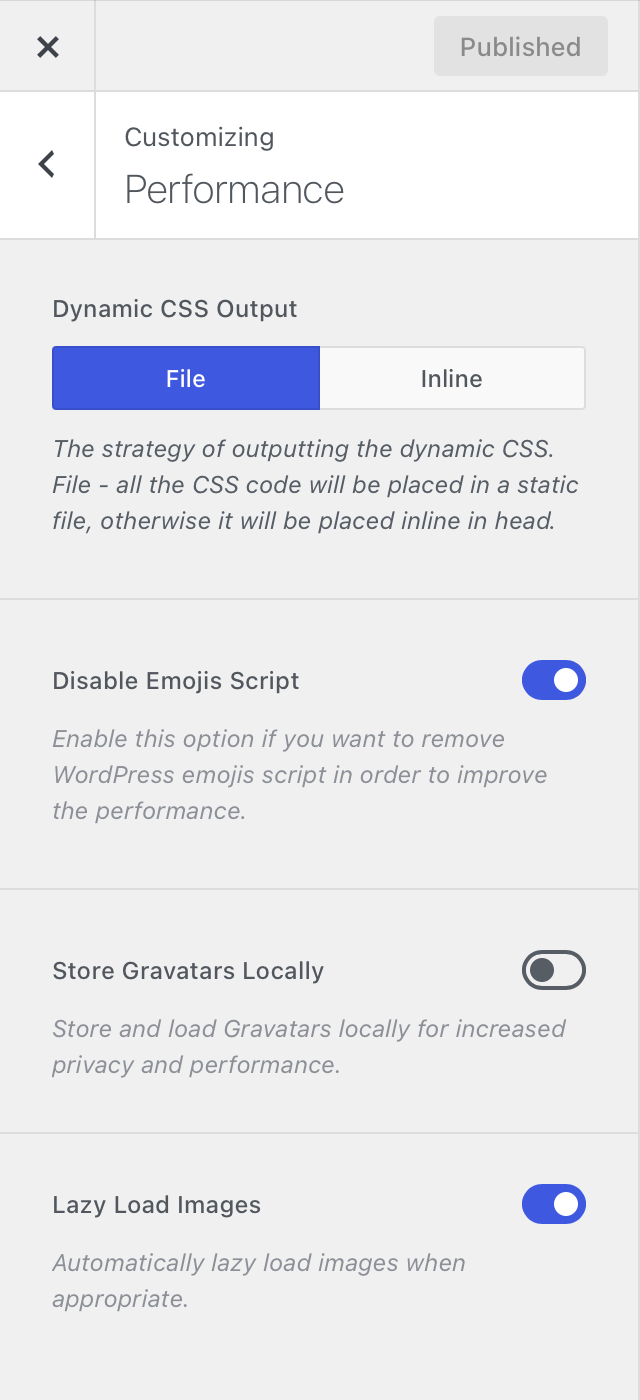
Dynamic CSS Output
The Dynamic CSS Output setting controls how CSS generated from your Customiser configuration is delivered on the front end.
- File – stores the generated global CSS inside a
global.cssfile that is loaded on the front end using WordPress’ standard stylesheet system. - Inline – outputs the generated CSS directly inside the page HTML instead of loading it from a separate stylesheet.
The File option is the recommended mode for most websites. Because the generated styles are served as a regular CSS file, they can be cached by browsers, CDNs and compatible optimisation systems instead of being included again inside every page response.
The Inline option can be useful in specific environments or troubleshooting scenarios, but generally offers fewer caching benefits and requires the generated styles to be included directly in each page.
Disable Emojis Script
WordPress includes additional scripts and styles for its legacy emoji compatibility system. On modern browsers, this compatibility layer is generally unnecessary.
Enabling Disable Emojis Script prevents those additional WordPress emoji assets from loading, reducing unnecessary front-end requests.
Store Gravatars Locally
The Store Gravatars Locally option caches Gravatar images used by your website and serves the cached versions from your own server instead of requesting them directly from the external Gravatar service each time.
This can be particularly useful on websites with active comment sections or other areas that display many user avatars, as it can reduce repeated third-party requests.
Image Lazy Load
The Image Lazy Load option enables WordPress’ native lazy loading for all images generated by Blocksy. It follows the lazy-loading principles implemented in WordPress core.
Once enabled, lazy loading works automatically and requires no additional configuration.
Performance optimisation works best in layers
Blocksy already loads many of its assets only when they are required. If you also use a caching or optimisation plugin, avoid enabling aggressive CSS or JavaScript processing without testing the result, as overlapping optimisations can sometimes interfere with dynamic theme functionality.