



The Breadcrumbs block lets you place Blocksy’s breadcrumb navigation directly inside layouts created with the WordPress block editor. It displays the visitor’s current position within the website hierarchy and provides links back through the relevant parent sections.
It is particularly useful inside Content Block templates, where breadcrumbs can be positioned independently from Blocksy’s standard Page Title area.
Blocksy Companion required
The Breadcrumbs block becomes available after installing and activating Blocksy Companion. Its breadcrumb structure and provider are controlled by Blocksy’s global Breadcrumbs settings.
Getting Started
Open the WordPress block inserter and search for Breadcrumbs, then add the block wherever you want the breadcrumb trail to appear.
The breadcrumb hierarchy itself follows the configuration available under Customiser → General Options → Breadcrumbs. From there, you can control options such as the separator, Home item, current-page visibility and other global breadcrumb behaviour.
For a complete overview of these settings, see the Breadcrumbs documentation.
Granular Controls
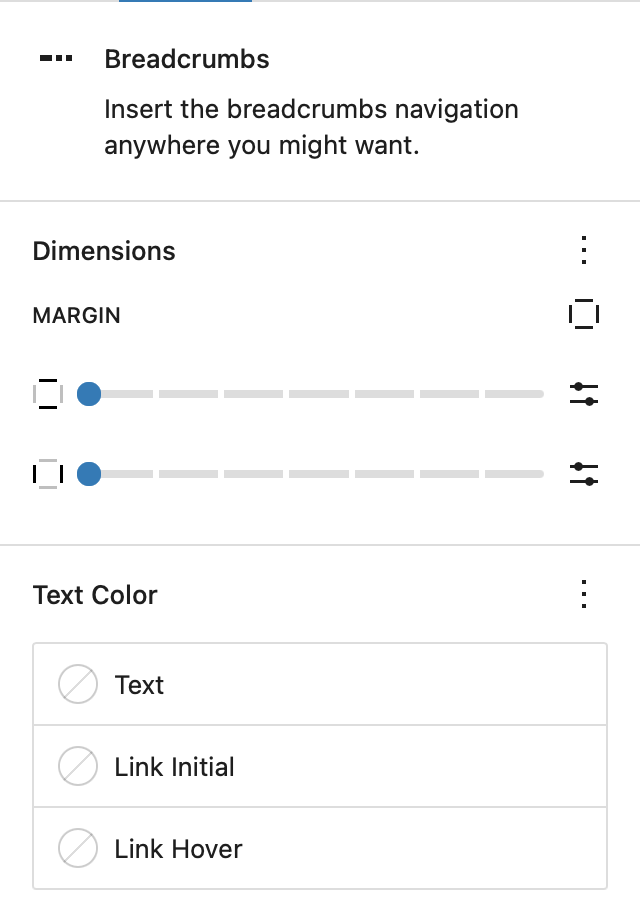
Margins
Adjust the spacing around the Breadcrumbs block using its margin controls. Individual values can be configured for the top, right, bottom and left sides to position the breadcrumb trail correctly within the surrounding layout.
Colors
Customise the Colors used by the breadcrumb trail independently from the surrounding content.
- Text Color – controls the appearance of non-linked breadcrumb text.
- Link Color – controls the default Color of clickable breadcrumb entries.
- Link Hover Color – controls how breadcrumb links appear when a visitor hovers over them.
These controls affect the presentation of the Breadcrumbs block without changing the global breadcrumb hierarchy configured in the Customiser.
Third-Party Breadcrumb Providers
The Breadcrumbs block can also display breadcrumb output from a supported third-party provider when that provider has been selected under Customiser → General Options → Breadcrumbs.
Current integrations include:
- Rank Math
- Yoast SEO
- SEOPress
- Breadcrumb NavXT
When a supported provider is selected, Blocksy uses that provider’s generated breadcrumb trail while retaining the Breadcrumbs block as the placement method inside the editor layout.