



The Product Status Filter in Blocksy Pro gives your visitors a simple way to filter products according to their current status. Available statuses include In Stock, Out of Stock, On Backorder, Featured, and On Sale, making it easier for customers to narrow down your product catalogue.
Adding the Product Status Filter
To add the filter to your store:
- Navigate to Appearance → Widgets in your WordPress dashboard.
- Open the widget area where you would like the filter to appear.
- Search for the Filter by Status block, identifiable by its star in a box icon.
- Add the block to your chosen widget area.
How It Works
Once added, the Filter by Status block lets you choose which product statuses should be available to your visitors. You can use it to help customers quickly find products that are currently in stock, browse discounted items, discover featured products, or combine several statuses for more precise filtering.
Granular Controls
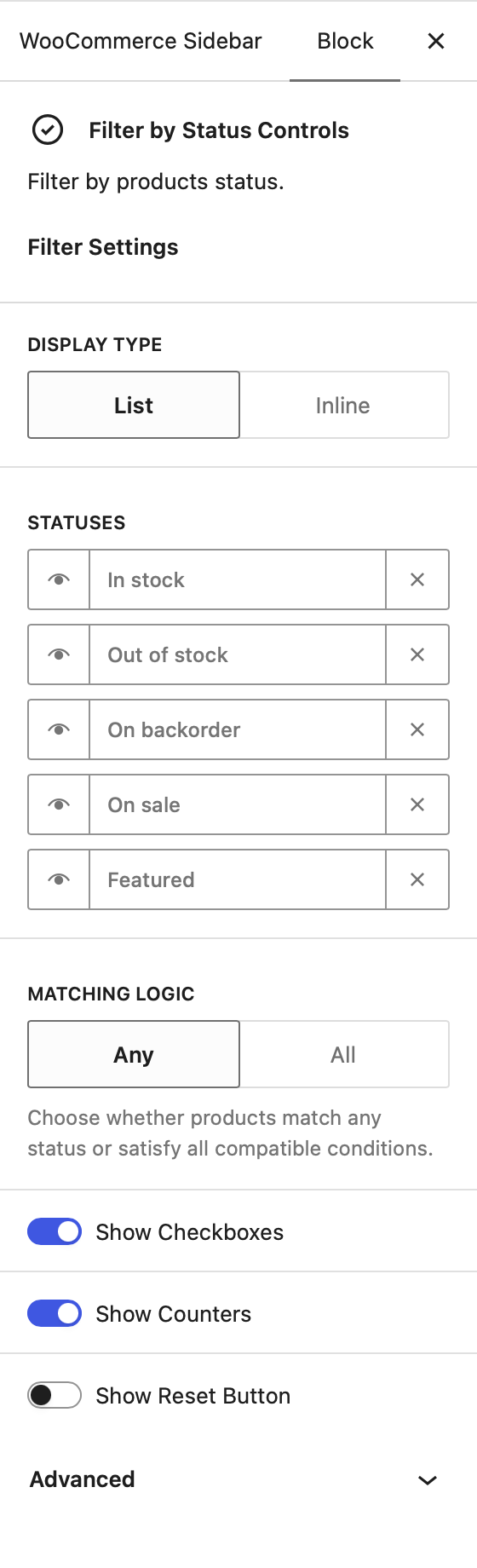
After adding the block, its settings are available directly from the block options sidebar.
Display Type
Choose how the available statuses are presented. The List option displays them vertically, while Inline arranges them horizontally and allows them to wrap onto additional rows when needed.
Statuses
Select which product statuses visitors should be able to filter by. You can also rearrange their order to prioritise the options that are most relevant to your store.
Matching Logic
The Matching Logic setting controls how multiple selected statuses are combined when filtering products.
- Any – A product only needs to match one of the selected statuses. For example, selecting In Stock, On Sale, and Featured will display products matching any of those conditions.
- All – Selected statuses are combined more strictly. Stock-related statuses are grouped together using OR logic, while On Sale and Featured are combined with that group using AND logic.
For example, selecting all available statuses with the All logic results in the following relationship: (In Stock OR Out of Stock OR On Backorder) AND On Sale AND Featured. This allows customers to filter for products that satisfy the selected promotional statuses while still matching any applicable stock state.
Additional Options
Show Checkboxes adds a checkbox next to each status, providing a clear visual indication of the currently selected filters.
Show Counters displays the number of matching products next to each available status.
Show Reset Button adds a reset control beneath the filter, allowing visitors to quickly clear their selections and return to the unfiltered product listing.