



The Adobe Fonts extension connects Blocksy with an Adobe Fonts Web Project, making the typefaces from that project available throughout Blocksy’s typography controls.
The integration uses the Project ID provided by Adobe Fonts, so there is no need to manually add embed code or configure individual font families inside Blocksy.
Blocksy Pro required
The Adobe Fonts integration is available through the Adobe Fonts extension included with Blocksy Pro. An Adobe account with access to the fonts used by your Web Project is also required.
Getting Started
First, create or open a Web Project from your Adobe Fonts account and add the font families and variations that you want to use on your website.
Once the project is ready, copy its Project ID from the Adobe Fonts dashboard.
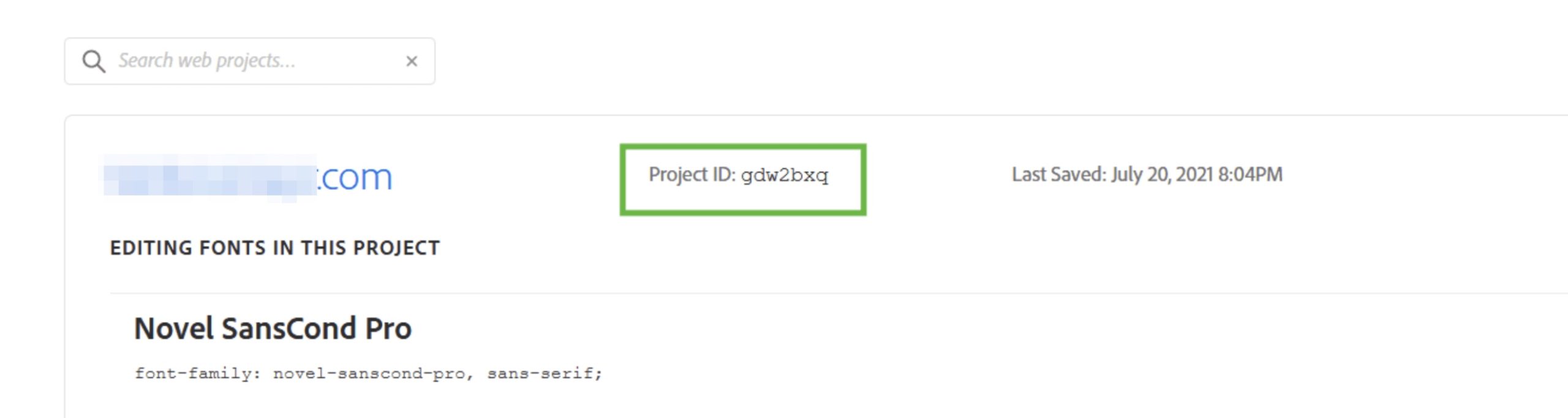
Then, complete the connection from WordPress:
- Navigate to WordPress Dashboard → Blocksy → Extensions.
- Activate the Adobe Fonts extension.
- Open the extension’s settings and paste your Adobe Fonts Project ID.
- Save the changes and allow Blocksy to retrieve the fonts associated with the project.
Using Adobe Fonts
Once the project has been connected successfully, its fonts become available inside Blocksy’s font selectors alongside the other supported font sources.
Adobe Fonts are identified by an A icon in the font selector, making it easy to distinguish them from system fonts, Google Fonts, locally hosted fonts and custom fonts.
You can then select them anywhere Blocksy’s Typography controls are available. Adobe Fonts are also available to supported native WordPress blocks that provide typography controls.
If you later add or remove fonts from the connected Adobe Fonts project, update the extension so Blocksy can retrieve the latest project configuration.
Font Delivery & Licensing
Adobe Fonts used on a website are delivered through Adobe’s web font service rather than being stored locally on your WordPress installation. This means visitors’ browsers make requests to Adobe’s infrastructure when those fonts are loaded.
If your website has specific privacy requirements regarding third-party requests, take this into account when deciding whether Adobe Fonts is appropriate for your setup.
Adobe Fonts usage is governed by Adobe’s own licensing terms. Fonts provided through the service can be used for supported web projects while the relevant Adobe subscription and licensing requirements are met. Adobe does not permit fonts from the service to simply be downloaded and self-hosted under the standard Adobe Fonts web licence.