



The Cookies Consent extension adds a configurable consent notice to your website, allowing visitors to accept or decline the use of cookies before supported Blocksy integrations are loaded.
It also provides privacy-policy consent options for supported forms and integrates directly with Google Analytics when analytics tracking is configured through Blocksy.
Important
Cookies Consent is a lightweight consent solution for Blocksy’s supported functionality. It cannot automatically detect or control cookies and scripts introduced by third-party plugins, embedded services or custom integrations. If your website requires comprehensive consent management, consider using a dedicated consent-management solution instead.
Getting Started
To activate the Cookies Consent extension:
- Navigate to WordPress Dashboard → Blocksy → Extensions.
- Locate the Cookies Consent extension.
- Enable the extension.
- Open Customiser → Cookies Consent to configure the notice.
Once enabled, the consent notice becomes available on the front end using the content and design options configured in the Customiser.
Granular Controls
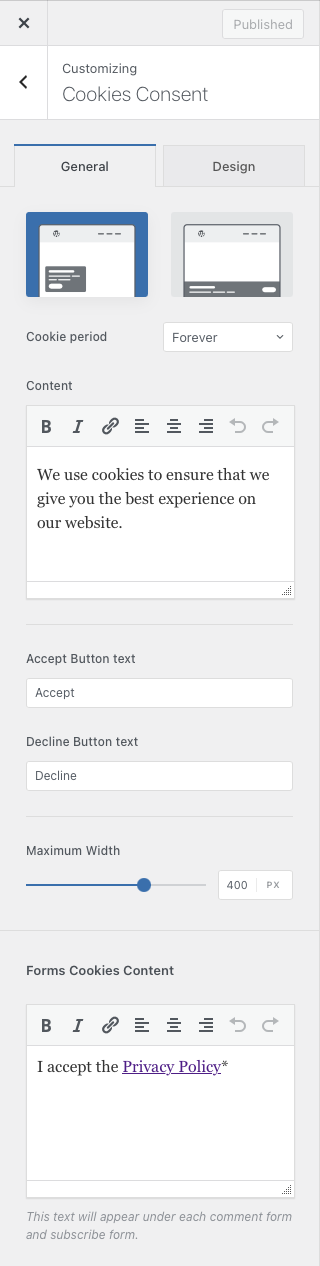
Display Type
Choose how the consent notice is presented to visitors:
- Boxed – displays the notice inside a compact floating box near the bottom of the browser window.
- Banner – displays the notice across the bottom of the website, providing a wider area for its message and actions.
Consent Message
Customise the message displayed inside the consent notice. This is where you can explain how cookies are used on your website and provide any additional information visitors should review before making their choice.
Consent Buttons
Configure the actions available to visitors and customise the labels used by the consent buttons, including the Accept and Decline actions where enabled.
The corresponding design controls let you adjust the appearance of these buttons so they fit naturally with the rest of your website.
Forms Cookie Consent
The Forms Cookie Consent settings add a privacy-policy consent checkbox to supported forms generated by Blocksy and WordPress, including areas such as the comments form.
You can customise the message associated with the checkbox to explain what the visitor is agreeing to before submitting the form.
Google Analytics Integration
Cookies Consent integrates directly with the Google Analytics option available under Customiser → General Options → Visitor Engagement.
When Google Analytics is configured through Blocksy and the Cookies Consent extension is active, the analytics script is loaded only after the visitor accepts cookies. If consent has not been granted, Blocksy does not initialise that analytics integration.
For details on configuring analytics through Blocksy, see the Visitor Engagement documentation.
Third-party services
This integration applies to Google Analytics loaded through Blocksy. Scripts, cookies or tracking technologies added by third-party plugins, external embeds or custom code are outside the scope of the Cookies Consent extension and may require their own consent-management solution.